Discovery ASK
Overview
AppNavi Discovery is introducing the ASK (Analyze Search Know) feature to simplify how users analyze discovered applications and usage data. Instead of manually searching through dashboards and reports, users can ask questions in natural language and receive clear, human-readable answers.
ASK follows the same secure architecture as Insights: OpenAI supports query interpretation and response generation, while all customer data processing remains inside the AppNavi AWS environment.
What ASK helps you do
What ASK helps you do
• Find out which applications are used most, or least, over a given period.
• Identify application trends and changes in usage.
• Analyze applications by category.
• Get answers without manual filtering or navigating complex dashboards.
Setup: Enabling ASK
ASK is controlled by two settings that work together. The Discovery-level setting depends on the tenant-level setting and cannot work on its own.
Enable AI at the tenant level
- Open Manage tenant from the left navigation menu.
- On the Settings tab, scroll to the AI Settings section.
- Turn on Enable AI Features ("Enabling this feature adds AI features in AppNavi").
- Select Save Changes.
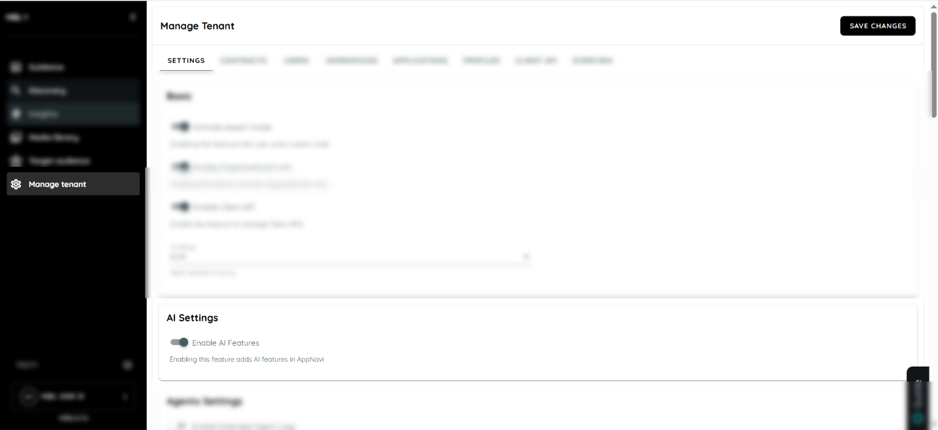
Manage Tenant > Settings > AI Settings, with Enable AI Features turned on.
Enable AI features in Discovery
Enable AI features in Discovery
- Open Discovery and go to Discovery Settings.
- On the Settings tab, in the Basic section, turn on Enable Discovery AI Features ("Enabling this feature adds AI features in Discovery").
- Select Save.
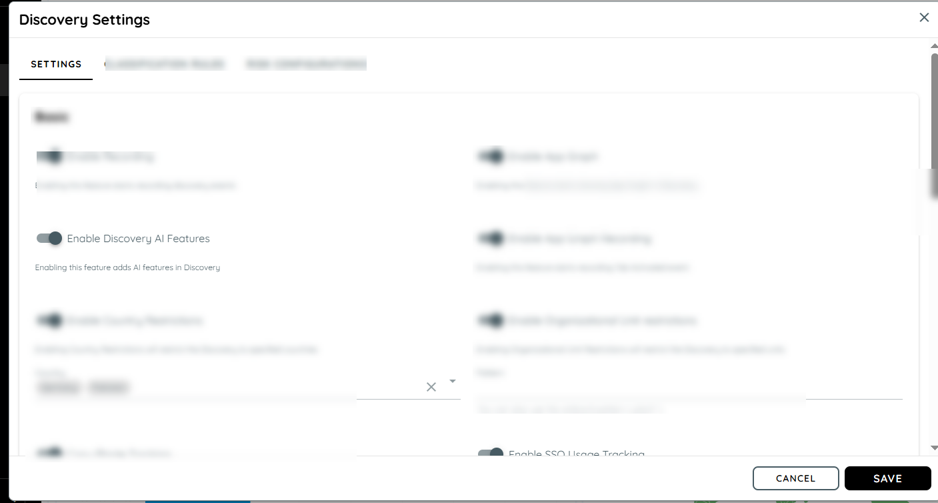
Discovery Settings > Settings, with Enable Discovery AI Features turned on.
How the two settings combine
| Tenant: Enable AI Features | Discovery: Enable Discovery AI Features | Result |
|---|---|---|
| Off | On or Off | ASK is unavailable. The ASK tab is not shown. |
| On | Off | The ASK tab is not shown. |
| On | On | The ASK tab is visible in Discovery and users have full access. |
Data Collected and Used by ASK
ASK answers questions using the application and usage data already collected by AppNavi Discovery. It does not collect new data on its own.
Open Discovery and select the ASK tab. The Analyze Search Know page opens with these elements:
• Message field ("Message AppNavi"): type your question in plain language.
• Send button (arrow icon, right of the field): submits the question.
• Conversation area: shows your question on the right and the ASK response on the left.
• Refresh icon (top right): clears the conversation / starts a new session.
Example: top used applications
- Type: What are the top 10 most used apps in last 90 days?
- Select the send button.
- ASK returns a ranked list of applications with a short summary.
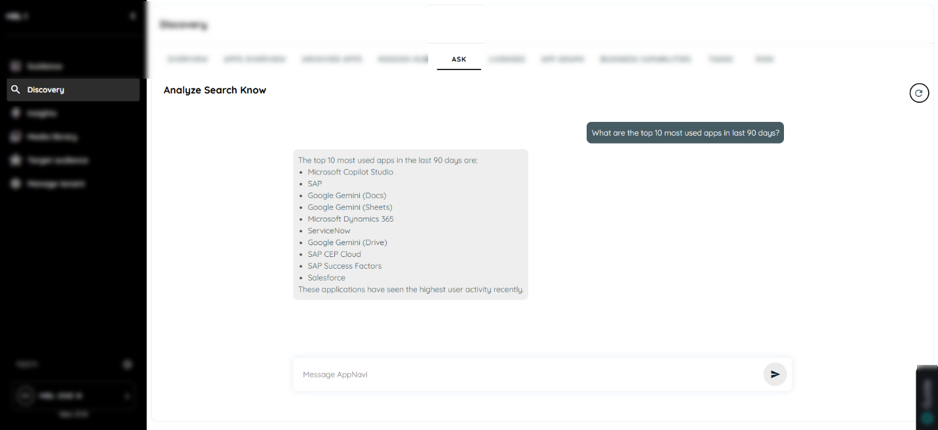
The ASK tab in Discovery.
Tips for writing good questions
• State the time range, for example "in the last 30 days" or "since January".
• Say how many results you want, for example "top 10".
• Name the category, application or metric you are interested in.
• Ask one question at a time.
Understanding the Response
Understanding the Response
Each response contains a clear natural-language answer. Depending on the question, it can also include:
• Application lists: for example a ranked list of the most used applications.
• Metrics tables: figures such as usage or user counts per application.
• Trend summaries: how usage has changed over a period.
Filters and Scoping
ASK replaces manual dashboard filtering. You narrow the results by including the filter in your question, for example a time range ("last 90 days"), a limit ("top 10") or a category ("collaboration apps").
What to add: List the filters ASK understands (time range, category, department/organizational unit, country, application name, user group, etc.).
Exporting Results
ASK results can be downloaded as a CSV file when the response includes a table view.
Download results as CSV
Download results as CSV
- Ask a question that returns tabular data, for example a metrics table or a list of applications with their values.
- When the response is shown in a table view, a Download button is displayed with the table.
- Click Download. The results are saved to your computer as a CSV file.
- Open the CSV file in Excel or any spreadsheet tool to filter, sort, or share the data further.
Note: The Download button is only displayed for responses that include a table view. Answers given only as text do not have a download option.
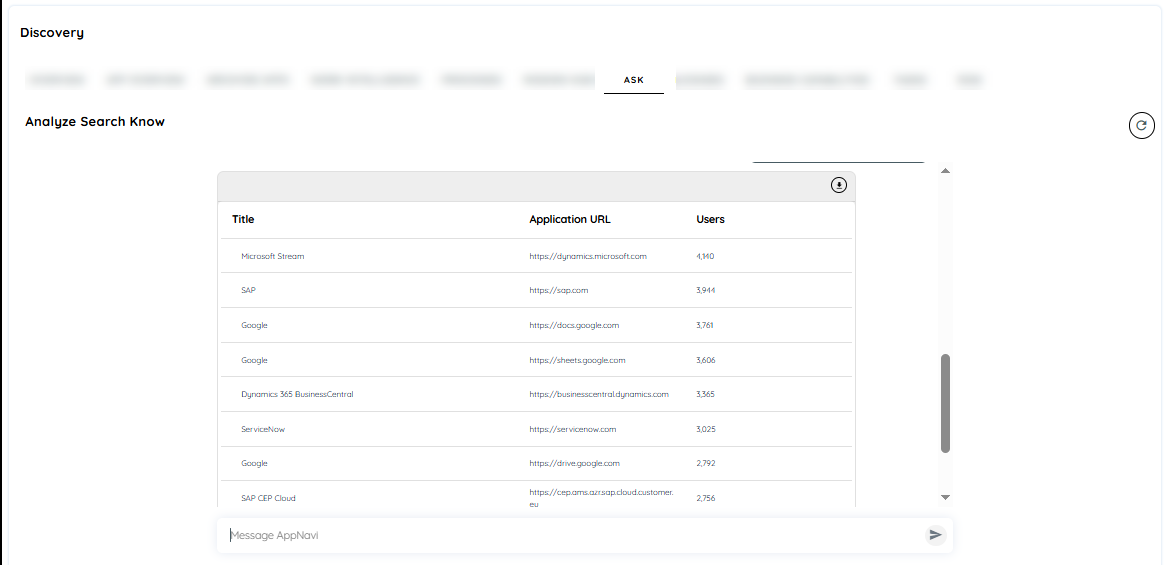
ASK results in table view, with the download icon (top right) for exporting as CSV.
Example Questions
Example Questions
The questions below show the kind of analysis ASK is designed for. Confirmed outputs are marked; others should be verified and updated.
| Question | Type of answer |
|---|---|
| What are the top 10 most used apps in last 90 days? | Ranked application list |
| Which applications had the biggest drop in usage in the last 30 days? | Application list with usage change |
| Which new applications were discovered this month? | Application list |
| How many applications are in each category? | Metrics table |
| Show the usage trend of Salesforce over the last 6 months. | Trend summary |
Updated 14 days ago