Mission Hub
Mission Hub helps organizations define and monitor business improvement initiatives through Missions and their associated Goals.
A Mission represents a broader business initiative, while Goals define the measurable outcomes that support that mission.
Mission Hub provides an overview of the goals assigned to a selected mission, including:
- Active goals
- Saved costs
- Reduced risk
- Cost savings over time
- Reduced risk over time
- Goal type composition
- Goal status composition
- Individual mission goals
You can select a mission from the mission dropdown to update the dashboard and view the analytics for that mission.
How Mission Hub Works
The basic workflow is:
Create Mission → Define Goals → Assign Goals to Mission → Track Progress → Review Mission Analytics
For example, an organization may create a mission called:
Field Service Route Optimization
The mission can contain several goals, such as:
- Reduce application usage costs
- Standardize application usage
- Consolidate licenses
- Reduce operational risk
Each goal can have its own owner, status, deadline, progress, and financial or risk impact.
Mission Hub then brings these goals together so the organization can monitor the overall mission.
When to Use Mission Hub
Mission Hub is useful when an organization wants to track a business initiative that consists of multiple measurable goals.
Typical use cases include:
- Application cost reduction
- License consolidation
- Application retirement
- Usage standardization
- Compliance improvement
- Data protection improvements
- Security improvement
- Vendor reduction
- Application landscape optimization
For example, an organization may have a goal to reduce the number of overlapping applications. The organization can create a mission for application optimization and assign goals that address license costs, redundant applications, and application usage.
Missions and Goals
It is important to understand the difference between a Mission and a Goal.
| Concept | Purpose |
|---|---|
| Mission | Represents the broader business initiative |
| Goal | Represents a specific outcome that contributes to the mission |
For example:
Mission:
Application Cost Optimization
Goals:
- Retire unused applications
- Consolidate overlapping licenses
- Standardize application usage
The mission provides the overall context, while the goals provide the individual objectives that can be tracked.
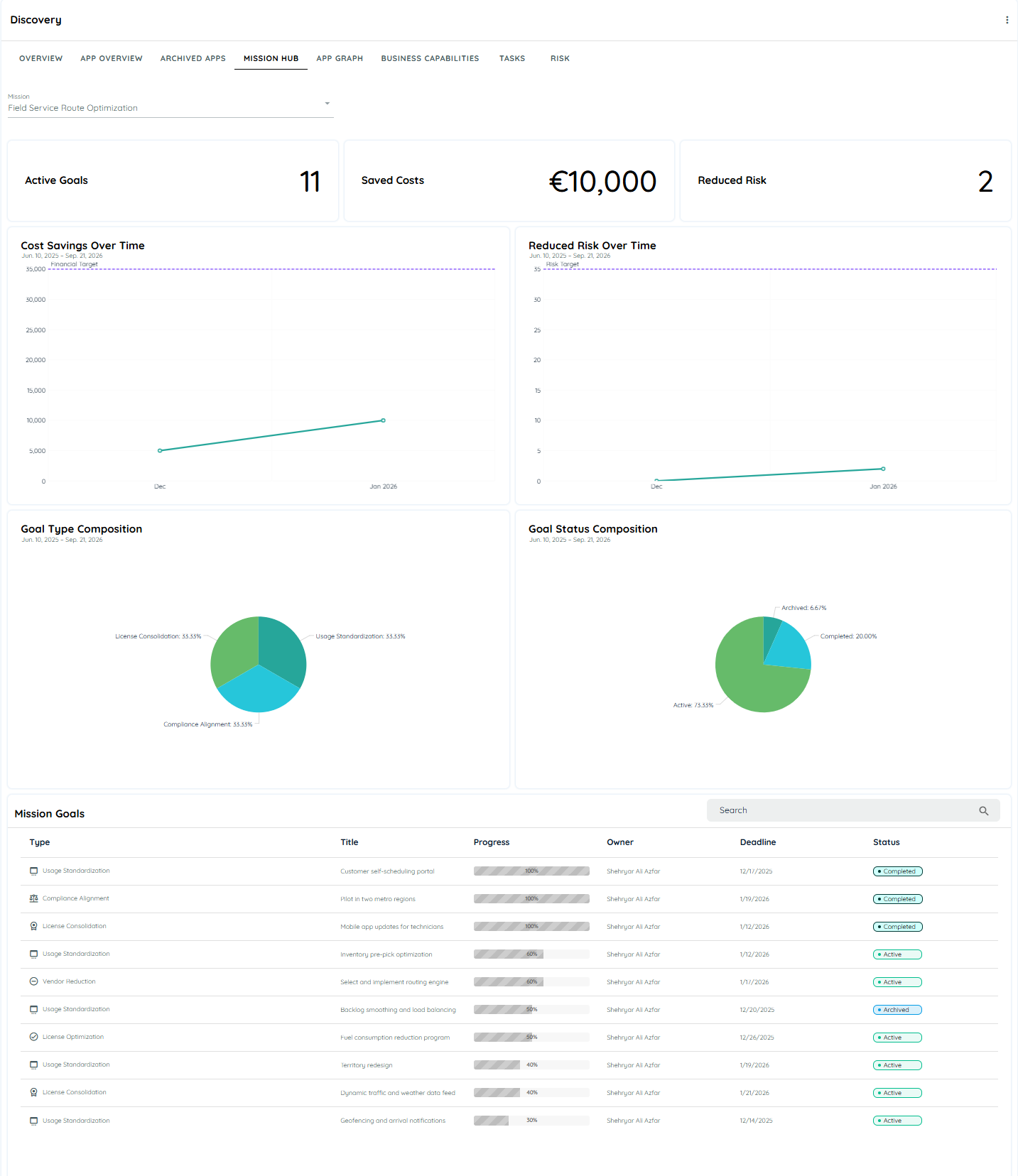
Mission Hub Dashboard
After selecting a mission, Mission Hub displays its associated analytics.
The dashboard contains three summary metrics at the top:
Active Goals
Shows the number of goals associated with the selected mission that are currently active.
Saved Costs
Shows the financial savings associated with the selected mission's goals.
Reduced Risk
Shows the risk reduction associated with the selected mission's goals.
The dashboard then provides charts for analyzing the mission over time and understanding its goal composition.
Screenshot guidance: Introduce the dashboard screenshot with an explanation such as: “The Mission Hub dashboard summarizes the selected mission and its goals. Use the mission selector to change the mission whose metrics and charts are displayed.”
Mission Selector
The Mission dropdown at the top of Mission Hub determines which mission is displayed.
When you select another mission:
- The active goal count changes.
- Saved cost information changes.
- Reduced risk information changes.
- The cost savings chart changes.
- The reduced risk chart changes.
- Goal type composition changes.
- Goal status composition changes.
- The Mission Goals list changes.
This allows you to analyze one mission at a time.
Dashboard Charts
Cost Savings Over Time
The Cost Savings Over Time chart shows how the financial savings associated with the selected mission change over the displayed period.
Use this chart to understand whether the mission is generating the expected financial impact over time.
For example, if a mission contains application retirement and license consolidation goals, the chart can help show how the associated savings develop as those goals progress.
Reduced Risk Over Time
The Reduced Risk Over Time chart shows the risk reduction associated with the selected mission over time.
This is useful for missions where the expected outcome is a reduction in operational, security, compliance, or other defined risks.
Goal Type Composition
The Goal Type Composition chart shows how the goals belonging to the selected mission are distributed by goal type.
The current Mission Hub supports two goal categories:
- Financial
- Risk
The chart helps you understand whether the selected mission is primarily focused on financial outcomes, risk reduction, or a combination of both.
Goal Status Composition
The Goal Status Composition chart shows the distribution of goals according to their current status.
For example, a mission can contain goals that are:
- Active
- Completed
- Archived
The chart provides a quick view of the current state of the mission's goals.
Mission Goals
The Mission Goals table provides the detailed view of the goals assigned to the selected mission.
The table shown in Mission Hub includes:
| Field | Meaning |
|---|---|
| Type | Indicates the goal category |
| Title | Name of the goal |
| Progress | Current progress toward the goal |
| Owner | Person responsible for the goal |
| Deadline | Target completion date |
| Status | Current state of the goal |
This table allows users to move from the high-level mission metrics to the individual goals that contribute to those metrics.
Search Mission Goals
The Mission Goals section provides a Search field.
Use it to locate a specific goal within the selected mission when the mission contains many goals.
For example, if the mission contains goals such as:
- Customer self-scheduling portal
- Inventory pre-pick optimization
- Territory redesign
- License consolidation
you can search for the relevant goal instead of manually reviewing the entire list.
Mission Management
Missions are created and maintained through Mission Management.
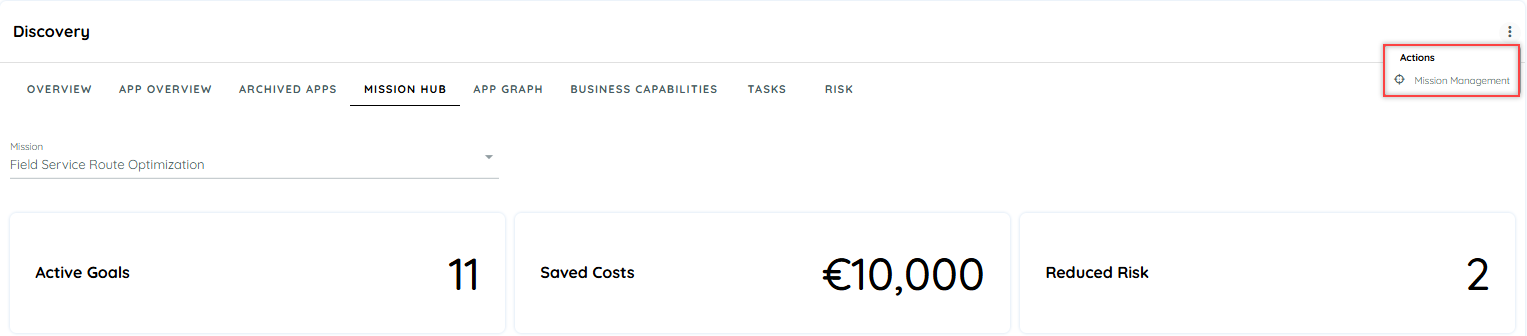
To open Mission Management:
- Open Discovery.
- Open the Mission Hub tab.
- Open the context menu in the top-right corner.
- Select Mission Management.
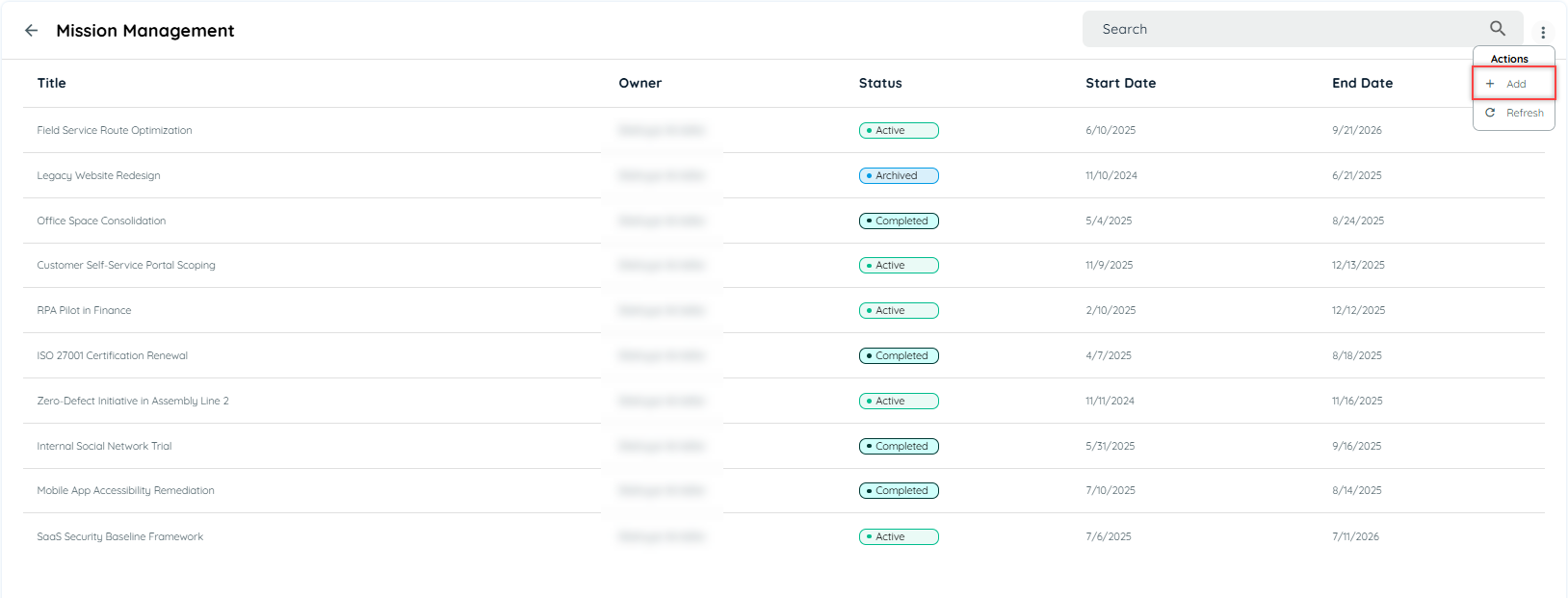
The Mission Management page displays existing missions and provides actions for creating and maintaining them.
Create a Mission
To create a mission:
- Open Mission Management.
- Open the Actions menu.
- Select Add.
- Complete the mission details.
- Select Save.
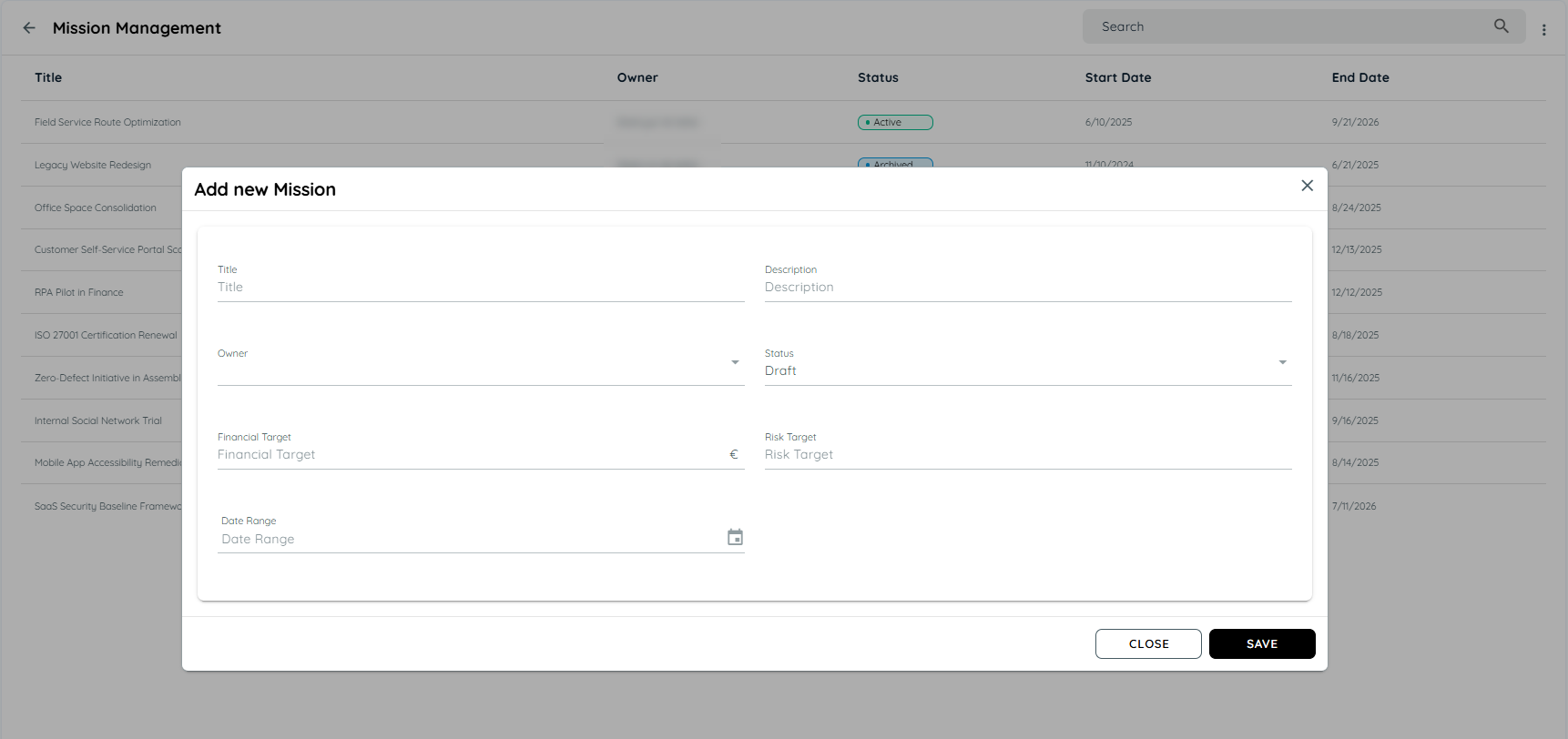
The Add New Mission dialog contains the following fields:
| Field | Purpose |
|---|---|
| Title | Name of the mission |
| Description | Explains the purpose of the mission |
| Owner | Person responsible for the mission |
| Status | Current mission state |
| Financial Target | Target financial value for the mission |
| Risk Target | Target risk-related value |
| Date Range | Time period for the mission |
Example Mission
Title:
Application Cost Optimization
Description:
Reduce application-related costs by removing redundant applications and consolidating overlapping licenses.
Owner:
Application Portfolio Manager
Status:
Active
Financial Target:
€50,000
Date Range:
January–December 2026
The exact values should reflect the organization's own business objectives.
Mission Status
A mission has a status that indicates its current state.
The Mission Management screen can display missions with statuses such as:
- Draft
- Active
- Completed
- Archived
Use the status to communicate the current lifecycle state of the mission.
For example:
Draft → Mission is being prepared.
Active → Mission is currently being worked on.
Completed → Mission has been completed.
Archived → Mission is retained for historical purposes but is no longer active.
The available statuses shown in the current interface include Active, Completed, and Archived, while the creation dialog shows Draft as the initial status.
Manage an Existing Mission
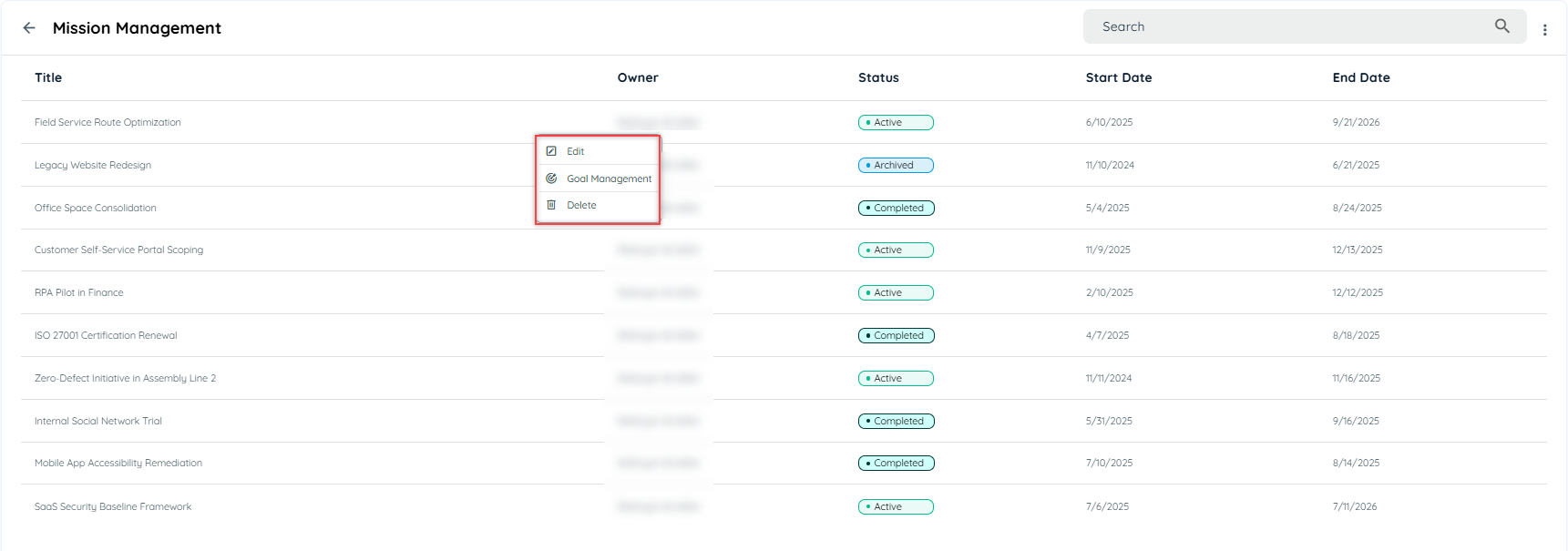
From Mission Management, open the action menu for a mission.
The available actions include:
- Edit
- Goal Management
- Delete
Edit a Mission
Use Edit when mission information needs to be changed.
For example, you may need to update:
- Mission description
- Owner
- Status
- Financial target
- Risk target
- Date range
Review the changes and save them to update the mission.
Delete a Mission
Use Delete when a mission is no longer required.
Before deleting a mission, review its associated goals and confirm that the mission should no longer be maintained.
Goal Management
Goals define the specific outcomes that support a mission.
To manage goals:
- Open Mission Management.
- Locate the required mission.
- Open its action menu.
- Select Goal Management.
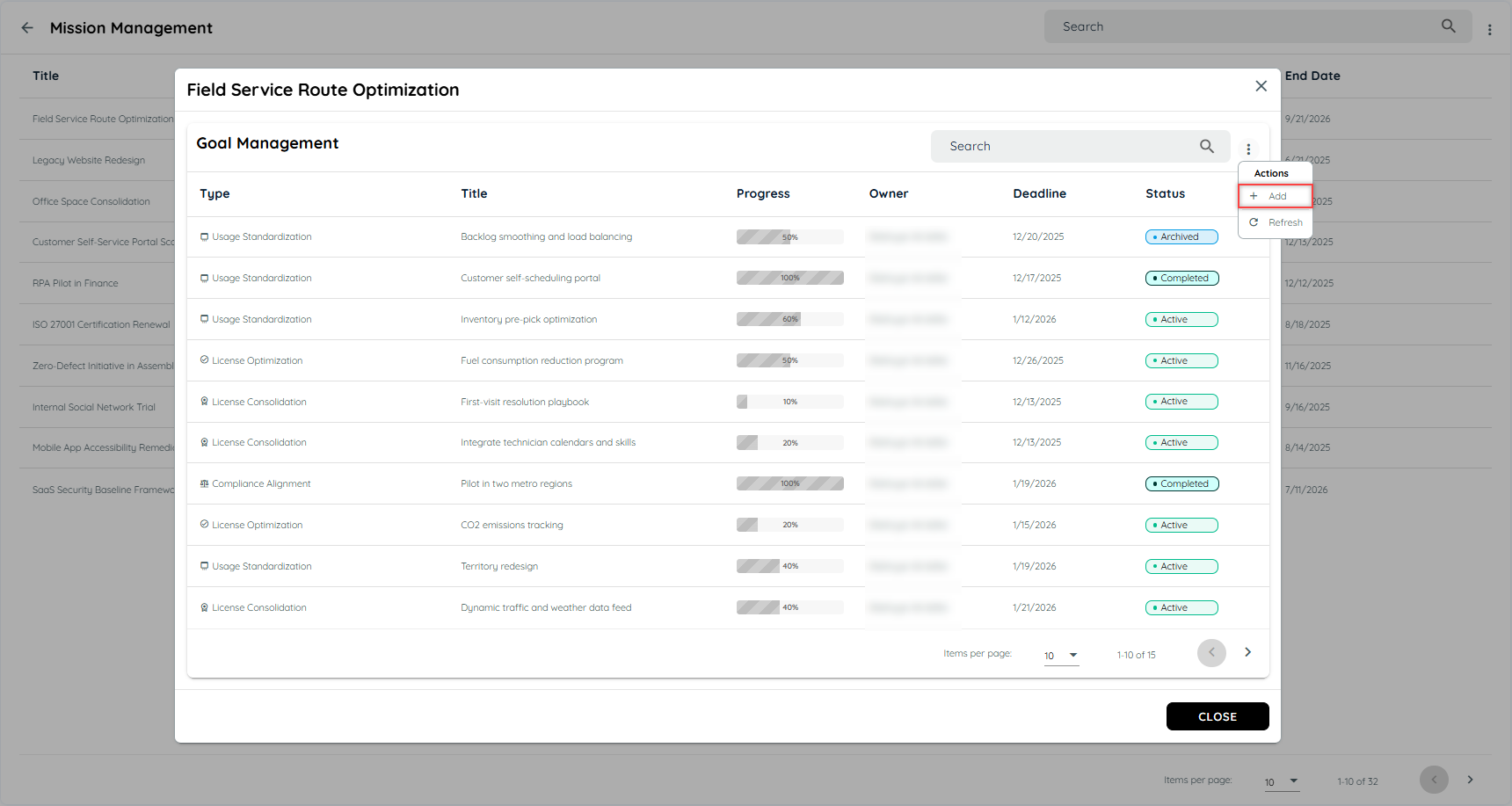
The Goal Management dialog displays the goals assigned to that mission.
From this view, you can:
- Add goals
- Review existing goals
- Edit goals
- Delete goals
Add a Goal
To add a goal to a mission:
- Open Goal Management for the required mission.
- Select Add.
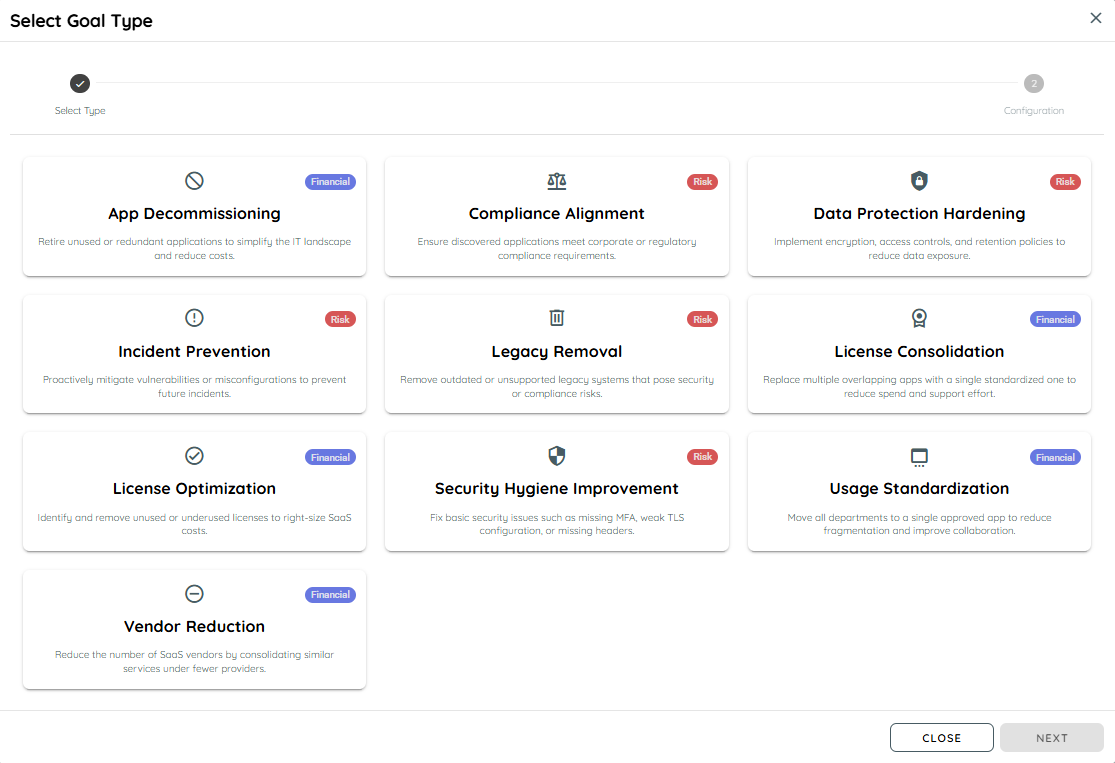
- Select the goal type.
- Configure the goal.
- Save the goal.
The goal creation process contains two stages:
Select Type → Configuration
Goal Types
Mission Hub supports two goal categories:
Financial Goals
Financial goals focus on measurable financial impact.
Examples shown in the interface include:
- App Decommissioning
- License Consolidation
- License Optimization
- Usage Standardization
- Vendor Reduction
These goals are intended for initiatives where the expected outcome can be represented through financial impact or cost savings.
Example
Goal: License Consolidation
Purpose: Reduce duplicated or overlapping application licenses.
Financial impact: €20,000
Impacted applications: Select the applications affected by the initiative.
Risk Goals
Risk goals focus on reducing a defined level of business, security, compliance, or operational risk.
Examples shown in the interface include:
- Compliance Alignment
- Data Protection Hardening
- Incident Prevention
- Legacy Removal
- Security Hygiene Improvement
These goals allow a mission to track outcomes where risk reduction is the primary objective.
Example
Goal: Security Hygiene Improvement
Purpose: Address application security weaknesses.
Risk level: Select the applicable risk level.
Impacted applications: Select the applications affected by the initiative.
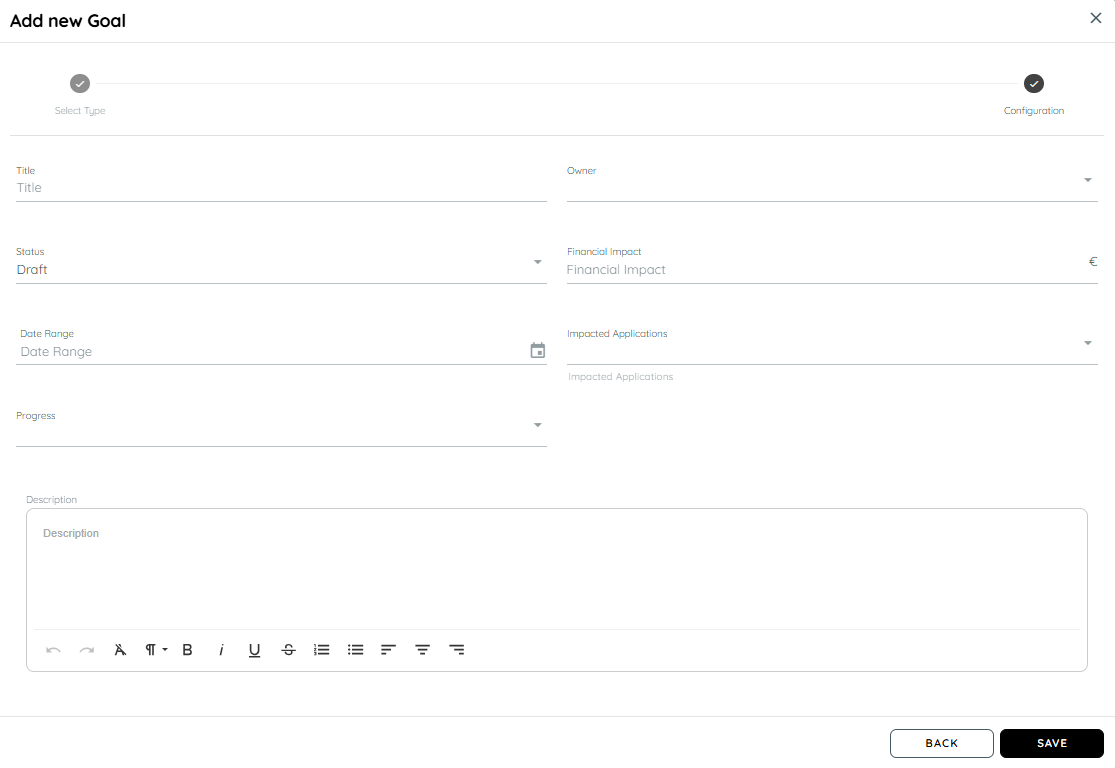
Configure a Financial Goal
After selecting a financial goal type, configure the goal details.
The current configuration screen contains:
- Title
- Owner
- Status
- Financial Impact
- Date Range
- Impacted Applications
- Progress
- Description
Example
Title:
License Optimization
Owner:
Application Portfolio Manager
Status:
Active
Financial Impact:
€15,000
Date Range:
January–June 2026
Progress:
60%
Impacted Applications:
Select the applications affected by the license optimization initiative.
Description:
Reduce unused or underused licenses and align licensing with actual application usage.
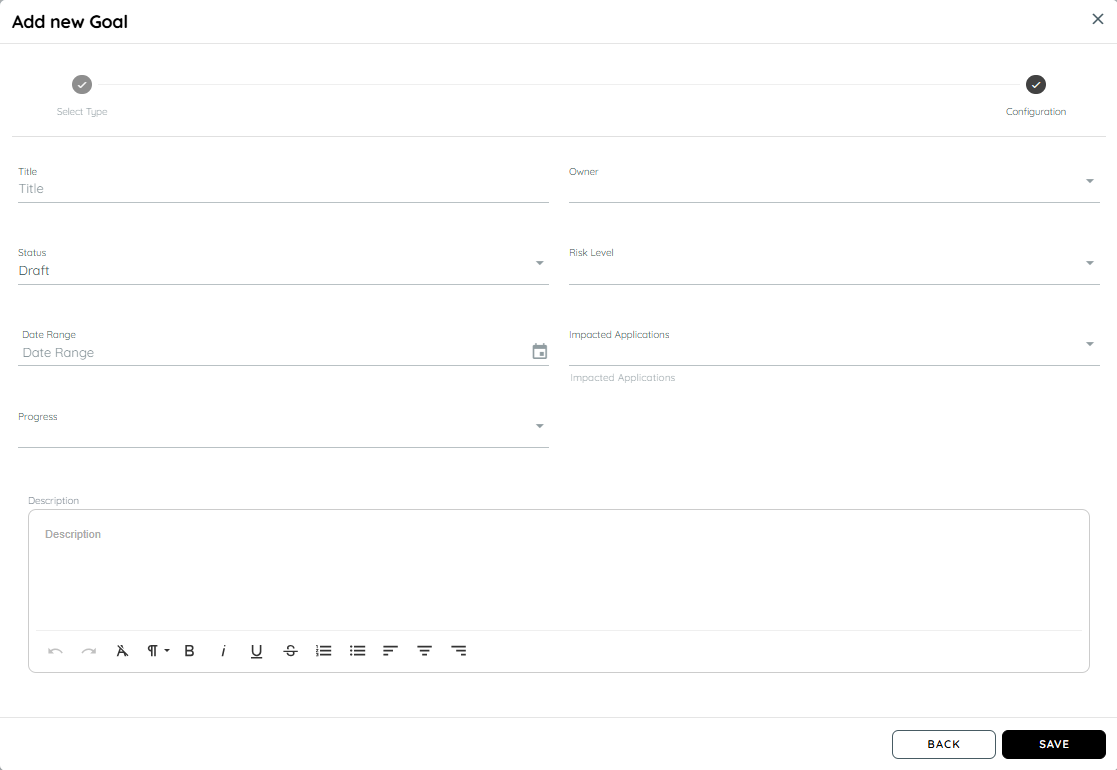
Configure a Risk Goal
Risk goals use a similar configuration process but capture a Risk Level instead of a Financial Impact.
The configuration screen contains:
- Title
- Owner
- Status
- Risk Level
- Date Range
- Impacted Applications
- Progress
- Description
Example
Title:
Security Hygiene Improvement
Owner:
Security Manager
Status:
Active
Risk Level:
Select the applicable risk level.
Date Range:
January–June 2026
Progress:
40%
Impacted Applications:
Select the applications affected by the initiative.
Description:
Improve application security by addressing identified security weaknesses.
Impacted Applications
Goals can be associated with Impacted Applications.
This allows the goal to identify the applications affected by the initiative.
For example, a License Optimization goal could identify the applications whose licenses are being reviewed or reduced.
A Data Protection Hardening goal could identify the applications included in a data-protection improvement initiative.
The exact applications selected should reflect the scope of the organization's goal.
Goal Progress
Each goal has a progress value.
Progress provides an indication of how far the goal has progressed toward completion.
For example:
0% — Work has not started.
50% — Work is partially complete.
100% — Goal is complete.
The Mission Goals table displays this progress so users can monitor individual goals from the selected mission.
Goal Status
Goal status describes the current state of an individual goal.
The Mission Hub interface can display statuses such as:
- Draft
- Active
- Completed
- Archived
Use the status together with progress and deadline to understand whether a goal is currently being worked on, has been completed, or is no longer active.
Editing and Deleting Goals
From Goal Management, users can maintain the goals associated with a mission.
Use Edit when the goal details need to be changed.
Use Delete when the goal is no longer required.
When modifying a goal, review its:
- Owner
- Status
- Progress
- Financial impact or risk level
- Date range
- Impacted applications
- Description
This helps ensure that the Mission Hub dashboard continues to reflect the intended business initiative.
Understanding the Dashboard Through an Example
Consider a mission called:
Field Service Route Optimization
The mission has 11 active goals.
Some goals may focus on:
- Usage standardization
- License optimization
- Compliance alignment
- Application optimization
The Mission Hub dashboard aggregates information from these goals.
For example:
| Dashboard area | What to understand |
|---|---|
| Active Goals | How many goals are currently active |
| Saved Costs | Financial savings associated with the mission |
| Reduced Risk | Risk reduction associated with the mission |
| Cost Savings Over Time | How financial savings change over time |
| Reduced Risk Over Time | How risk reduction changes over time |
| Goal Type Composition | Distribution of financial and risk goals |
| Goal Status Composition | Distribution of goal statuses |
| Mission Goals | Detailed view of the individual goals |
The values displayed in the documentation screenshot are example data and should not be interpreted as fixed expected values for every tenant.
Using Mission Hub with Demo Data
AppNavi Discovery provides a Demo Data import that creates sample data for demonstrating Discovery functionality.
When Discovery Demo Data is imported, demo missions and goals are created automatically. The demo data includes mission progress, goal details, and performance analytics.
This provides a convenient way to explore Mission Hub before creating customer-specific missions.
The demo workflow is:
Import Demo Data → Open Mission Hub → Select a Demo Mission → Review Goals → Explore Dashboard Analytics
Demo data is intended for demonstration and exploration. Customers should use their own mission and goal definitions when monitoring real business initiatives.
Customer Use Cases
Application Rationalization
A company wants to reduce the number of applications in its application landscape.
Create a mission such as:
Application Rationalization 2026
Possible goals:
- App Decommissioning
- License Consolidation
- Vendor Reduction
The mission dashboard can then be used to monitor the progress and financial impact of these goals.
License Optimization
A company wants to reduce spending on unused or underused licenses.
Create a mission such as:
License Cost Optimization
Possible goals:
- License Optimization
- License Consolidation
Use the financial impact and progress fields to track the expected outcome.
Security Improvement
A company wants to reduce security-related risks across selected applications.
Create a mission such as:
Application Security Improvement
Possible goals:
- Security Hygiene Improvement
- Data Protection Hardening
- Incident Prevention
The mission can then be monitored through the risk-related dashboard information.
Compliance Improvement
A company wants to improve compliance across its application landscape.
Create a mission such as:
Compliance Improvement
Possible goals:
- Compliance Alignment
- Legacy Removal
- Data Protection Hardening
The individual goals identify the specific areas being addressed.
Filters and Search
The current Mission Hub documentation does not describe a dedicated set of dashboard filters such as country, department, or organizational unit.
The documented dashboard selection mechanism is the Mission dropdown, which changes the displayed analytics to the selected mission.
The Mission Goals section also provides a Search field for locating goals within the selected mission.
Therefore, use:
- Mission selector to change the mission being analyzed.
- Goal search to find a specific goal within that mission.
Exports
The current Mission Hub documentation does not describe a dedicated Mission Hub export function.
The documented functionality focuses on creating and managing missions and goals and viewing their analytics within Mission Hub.
Do not assume that Mission Hub provides a CSV or Excel export unless the relevant export option is available in your tenant or documented separately.
Risk Goals:
Updated 29 days ago