
Workforce Persona & Automation Opportunities
Workforce Persona & Automation Opportunities
Workforce Persona & Automation Opportunities helps organizations understand how users work across applications and identify recurring cross-application workflows that may be suitable for further automation analysis.
The analysis is divided into two connected areas:
- Workforce Personas groups users with similar application-usage patterns into meaningful work personas.
- Automation Opportunities identifies application pairs that are frequently used together and evaluates whether those relationships may represent repeatable workflows with automation potential.
Use Workforce Personas first to understand who is working in similar ways and what applications they use. Then use Automation Opportunities to investigate which application relationships may represent repetitive or manual workflows.
Important: These features identify patterns for investigation. They do not automatically determine that a process should be automated or that an existing technical integration between two applications exists.
Customer Workflow
Use the following workflow to move from workforce analysis to automation investigation:
- Open Work Intelligence in the AppNavi Portal.
- Review the Workforce Personas results.
- Identify personas with recurring or highly manual work patterns.
- Select a persona and review its detailed analytics.
- Review the applications contributing to the persona.
- Identify application combinations that appear repeatedly within the work pattern.
- Open Automation Opportunities.
- Review the application pairs identified from organizational usage data.
- Use filters, search, and sorting to focus the analysis.
- Compare Users, Active Days, Automation Potential, Usage Overlap, Workflow Confidence, Manual Work, Sensitivity, and Recurrence.
- Select an application pair to review its detailed analytics.
- Review the affected countries and departments.
- Validate the observed workflow with the relevant business or application owner.
- Prioritize the workflows that provide the strongest combination of business relevance, recurrence, manual work, and automation potential.
This workflow connects workforce analysis with automation investigation instead of treating the two features as separate dashboards.
1. Workforce Personas
What Are Workforce Personas?
Workforce Personas groups users with similar application-usage patterns into meaningful work personas.
The feature analyzes application usage across users and evaluates relationships between applications to identify common work patterns. Based on these patterns, AppNavi generates a business-oriented persona name and provides metrics that describe the identified pattern.
For example, personas may be identified as:
- Business Analyst
- Marketing Specialist
- Operations Manager
- Project Coordinator
- Customer Support Specialist
- Learning and Development Specialist
- Financial Controller
The generated name describes the observed usage pattern and does not necessarily represent the user's official organizational job title.
What Data Does Workforce Personas Analyze?
Workforce Personas analyzes application usage across users.
The resulting personas are based on indicators such as:
| Data / Indicator | What it tells you |
|---|---|
| Applications | Which applications are used by the users associated with the persona. |
| Application relationships | Which applications are used together as part of the observed pattern. |
| Users | How many users are associated with the persona. |
| Activity Time | Average activity time associated with the persona. |
| Active Days | Number of days on which the activity was observed. |
| Confidence | How strongly the observed usage supports the identified persona. |
| Risk | Potential risk associated with the applications and data usage. |
| Manual Work | Level of manual activity associated with the work pattern. |
| Recurrence | How consistently the application-usage pattern occurs. |
Workforce Personas Overview
The Workforce Personas table provides a high-level view of the identified work patterns.
| Metric | Description |
|---|---|
| Persona | Business-oriented name of the identified work pattern. |
| Users | Total number of users associated with the persona. |
| Activity Time | Average activity time associated with the persona. |
| Active Days | Number of active days associated with the observed pattern. |
| Confidence | Confidence level of the identified persona. |
| Risk | Risk level associated with the persona. |
| Manual Work | Level of manual activity associated with the persona. |
| Recurrence | Level of recurrence observed for the work pattern. |
How to Read the Overview
Do not evaluate a persona using one metric in isolation.
For example, a persona with:
- High Confidence
- High Recurrence
- High Manual Work
- A large number of Users
may represent a well-established work pattern that is worth investigating for process improvement or automation.
Review the applications associated with the persona before drawing conclusions about the type of work being performed.
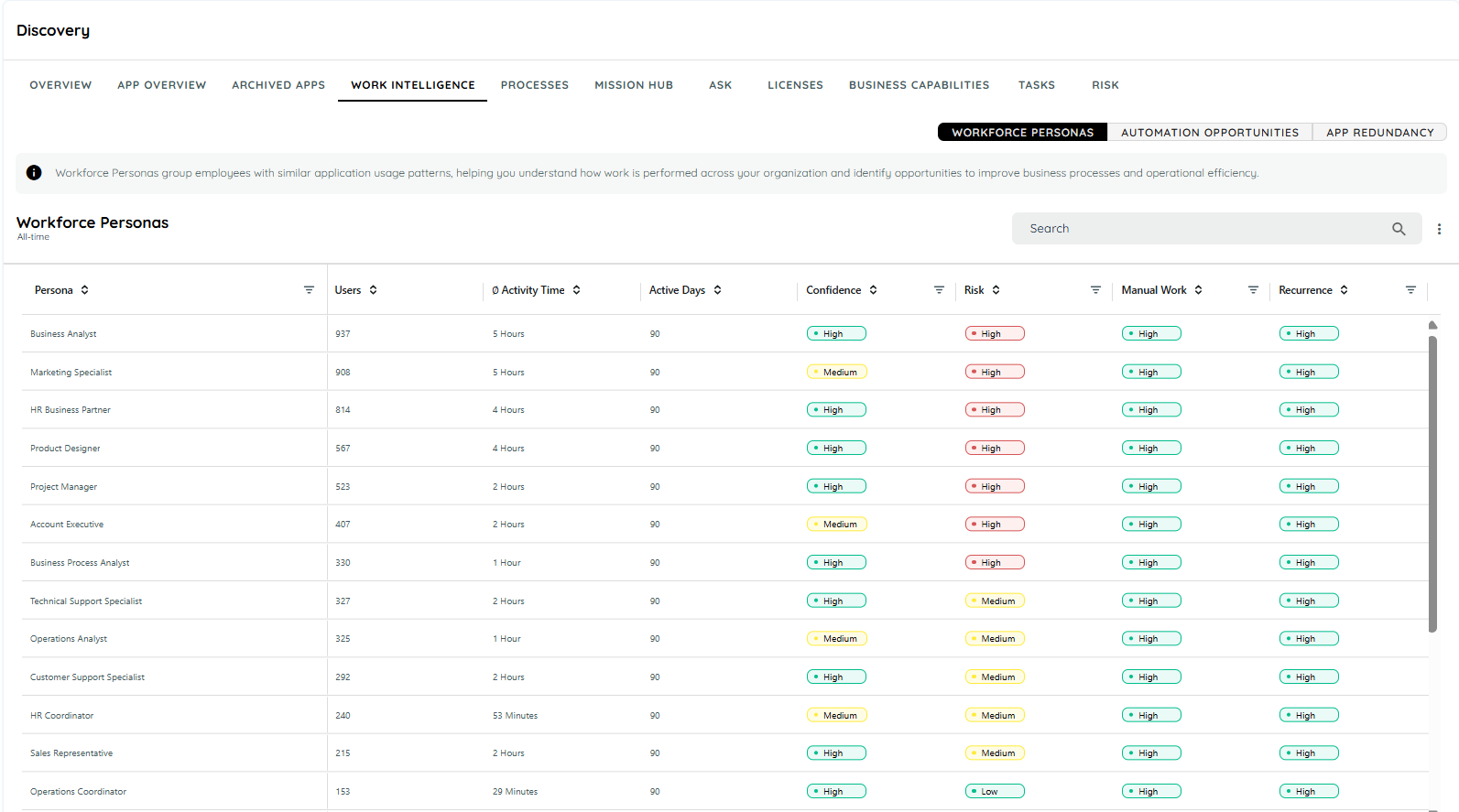
WorkForce Persona Overview
Persona Analytics
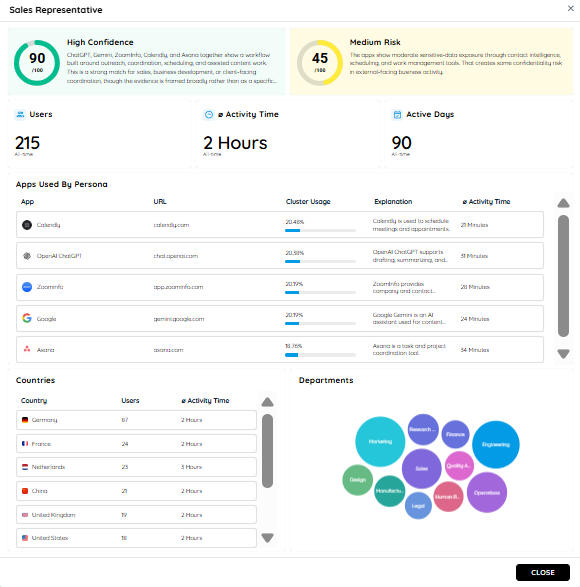
Select a persona from the Workforce Personas table to open its detailed analytics.
The detailed view provides additional information about the selected work pattern.
Confidence
Confidence indicates how strongly the observed application usage supports the identified persona.
The score is displayed from 0 to 100.
| Level | Meaning |
|---|---|
| High | Strong evidence supports the identified work pattern. |
| Medium | The available evidence provides a moderate indication of the work pattern. |
| Low | The available evidence provides limited support for the work pattern. |
Use Confidence to understand the strength of the evidence before drawing conclusions about the persona.
Risk
Risk indicates the potential risk associated with the applications and data usage observed for the persona.
Risk is represented as:
- Low
- Medium
- High
Risk may be influenced by observed sensitive-data activity and the types of applications used by the persona.
Use this indicator to identify personas that may require additional security, compliance, or data-governance review.
Users
The Users metric shows the total number of users associated with the selected persona.
For example:
Users: 937
means that 937 users are associated with the identified application-usage pattern.
A larger user population can indicate that the identified work pattern has broader organizational relevance.
Ø Activity Time
Ø Activity Time shows the average activity time associated with the persona.
The value can be displayed in minutes or hours depending on the calculated activity duration.
Review Activity Time together with Manual Work and Recurrence to understand the scale and consistency of the observed work pattern.
Active Days
Active Days shows the number of days on which activity associated with the persona was observed.
For example:
Active Days: 90
indicates that activity was observed across 90 days within the available data range.
A higher number of Active Days provides additional context when determining whether the pattern is recurring rather than occasional.
Manual Work
Manual Work indicates the level of manual activity associated with the identified work pattern.
A higher Manual Work score can indicate a pattern that is suitable for further process investigation.
Manual Work should be evaluated together with:
- Application usage
- Activity Time
- Recurrence
- Confidence
Important: A high Manual Work score does not automatically mean that a process can or should be automated.
Recurrence
Recurrence indicates how consistently the identified application-usage pattern occurs.
A high Recurrence indicates that the same or similar application pattern is observed repeatedly.
Recurring patterns can be investigated for:
- Process optimization
- Workflow improvements
- Standardization
- Automation opportunities
Applications Used by Persona
The Apps Used By Persona section shows the applications contributing to the selected persona.
| Column | Description |
|---|---|
| App | Name of the application. |
| URL | URL or domain associated with the application. |
| Cluster Usage | Percentage contribution of the application to the identified usage cluster. |
| Explanation | Description of the application's role within the work pattern. |
| Ø Activity Time | Average activity time associated with the application. |
Cluster Usage
Cluster Usage represents the contribution of an application to the application-usage cluster associated with the persona.
For example:
| Application | Cluster Usage |
|---|---|
| Google Docs | 20.45% |
| Google Gemini | 20.40% |
| Microsoft Word Online | 20.34% |
| SAP CEP Cloud | 18.24% |
Use these values to understand which applications contribute most strongly to the identified usage pattern.
Do not interpret the persona based on one application alone. The combination of applications provides the context for understanding the work pattern.
Application Explanation
The Explanation field provides a business-oriented description of the application's role within the identified persona.
For example, applications used for:
- Customer relationship management
- Contact research
- Scheduling
- Project management
may collectively provide evidence of a sales-oriented work pattern.
This helps move the analysis from:
"Which applications are being used?"
to:
"What type of work might this application combination support?"
Workforce Persona Example
Consider a persona with:
| Indicator | Example |
|---|---|
| Confidence | High |
| Risk | Medium |
| Users | 937 |
| Active Days | 90 |
| Manual Work | High |
| Recurrence | High |
This combination suggests a well-established work pattern involving a significant user population and repeated manual activity.
The next step should be to review the applications associated with the persona and understand the underlying work pattern.
If the same applications repeatedly appear together, continue the investigation in Automation Opportunities.
Automation Opportunities
What Are Automation Opportunities?
Automation Opportunities identifies application pairs that are frequently used together and may represent opportunities for process automation.
It analyzes application usage across users and active days and provides indicators for:
- Automation Potential
- Usage Overlap
- Workflow Confidence
- Manual Work
- Sensitivity
- Recurrence
This helps organizations identify repetitive cross-application workflows and prioritize workflows that may benefit from further automation analysis.
Access Automation Opportunities
To access Automation Opportunities:
- Open the AppNavi Portal.
- Navigate to Work Intelligence.
- Select the Automation Opportunities tab.
- Review the application pairs displayed in the table.
- Use the available filters, search, and sorting options to focus on specific opportunities.
Automation Opportunities Overview
Each row in the Automation Opportunities table represents an application pair identified from organizational usage data.
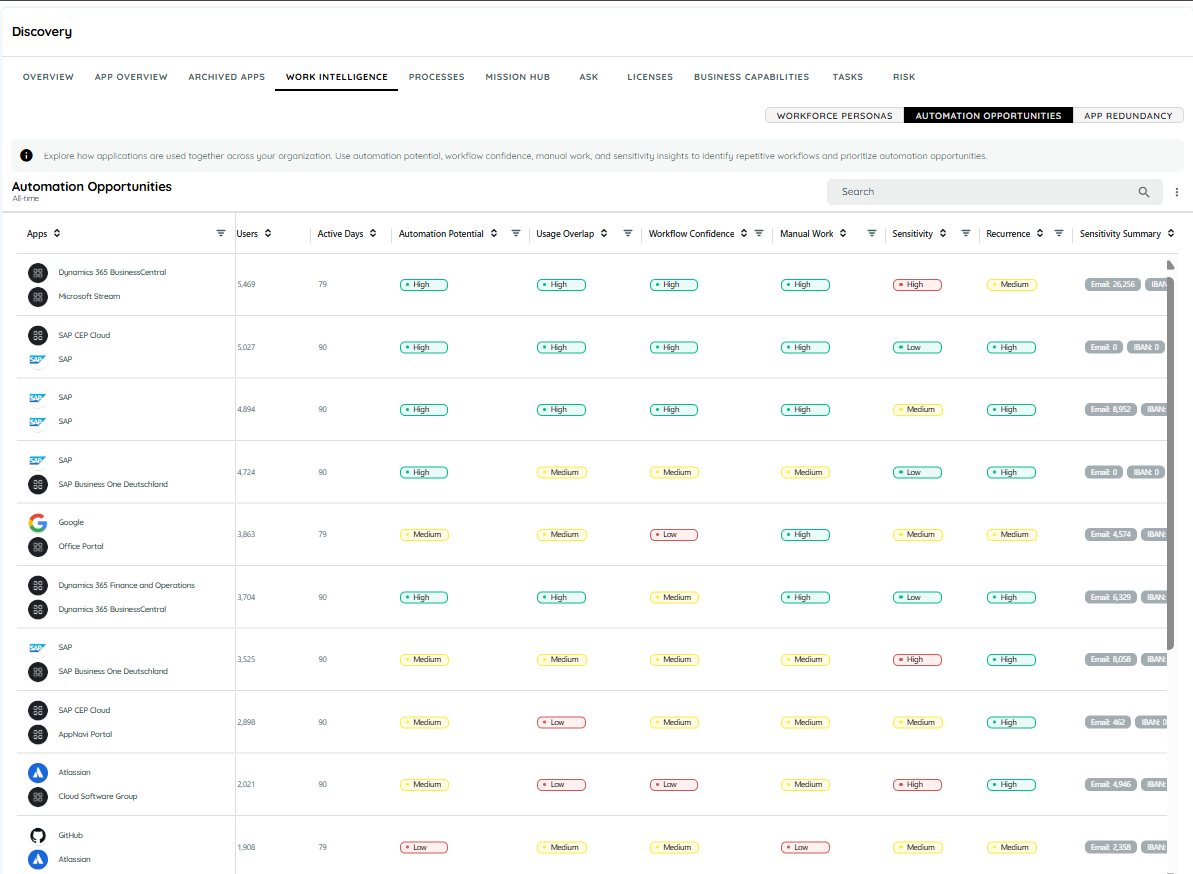
Automation Opportunities Overview
| Metric | Description |
|---|---|
| Apps | The two applications identified as being used together. |
| Users | Number of users associated with the application pair. |
| Active Days | Number of days on which the application pair was actively used. |
| Automation Potential | How suitable the observed usage pattern may be for automation. |
| Usage Overlap | How strongly the two applications are used together. |
| Workflow Confidence | How consistently the application relationship forms a recognizable workflow. |
| Manual Work | Level of manual interaction involved in transferring or handling information between applications. |
| Sensitivity | Level of potentially sensitive data involved in the observed workflow. |
| Recurrence | How repeatedly the workflow pattern occurs. |
| Sensitivity Summary | Additional information about detected sensitive-data categories and their counts. |
Understanding an Application Pair
Each Automation Opportunity represents two applications that demonstrate a measurable relationship in organizational usage.
For example:
Dynamics 365 Business Central → Microsoft Stream
The arrow represents an observed usage relationship.
It does not necessarily mean that:
- The applications have a technical integration.
- One application directly triggers the other.
- An API exists between the applications.
- Automation is already technically possible.
The application pair is derived from activity observed across users and time and represents a potential workflow pattern.
Users
The Users column shows the number of users associated with the application pair during the selected reporting period.
A higher number indicates that the observed application relationship occurs across a broader user population.
For example:
- 100 users → observed across a smaller user group.
- 1,000+ users → may represent a broader organizational opportunity.
Use Users to help estimate the potential organizational reach of an opportunity.
Active Days
Active Days represents the number of days on which activity associated with the application pair was observed.
A higher number indicates that the application relationship persists over a longer period rather than appearing as an isolated event.
For example:
90 Active Days
indicates that the application pair was observed during the reporting period represented by the data.
Automation Potential
Automation Potential indicates how suitable an application pair may be for automation based on the observed usage pattern.
The score considers signals such as repeated application usage, user coverage, and recurring activity.
| Level | Meaning |
|---|---|
| High | Strong evidence that the application pair represents a potentially automatable workflow. |
| Medium | Some evidence of automation potential, but additional analysis may be required. |
| Low | Limited evidence that the application relationship represents a suitable automation opportunity. |
Important: A High Automation Potential score is a prioritization signal. It does not confirm that automation can definitely be implemented.
Usage Overlap
Usage Overlap indicates how strongly the two applications are used by the same users and within related activity patterns.
A high overlap means that the applications frequently appear together in the observed usage data.
A lower overlap indicates that the applications have less consistent overlap.
Example
If many users who interact with Application A also interact with Application B within related activity patterns, the pair may have high Usage Overlap.
This provides evidence that the applications may be part of the same broader work pattern.
Workflow Confidence
Workflow Confidence measures how clearly the application relationship resembles a repeatable workflow.
It considers factors such as:
- Repeated application pairing
- Consistency of usage
- Directionality between applications
- Activity across users
- Recurrence over time
| Level | Meaning |
|---|---|
| High | The application relationship shows a clear and repeatable workflow pattern. |
| Medium | A workflow pattern is visible, but the relationship is less consistent. |
| Low | The application relationship is weak or inconsistent. |
A High Workflow Confidence indicates that the applications repeatedly appear together in a recognizable sequence or usage pattern.
It does not necessarily mean that one application directly triggers the other.
Manual Work
The Manual Work indicator represents the amount of manual interaction associated with the observed workflow.
It is particularly useful for identifying workflows where users repeatedly move or handle information between applications.
Observed signals may include:
- Copying information
- Pasting information
- Repeated transfer of content between applications
| Level | Meaning |
|---|---|
| High | Strong evidence of manual interaction or information transfer. |
| Medium | Moderate manual interaction is observed. |
| Low | Limited manual interaction is observed. |
A High Manual Work score combined with High Recurrence can represent an especially interesting automation candidate.
Sensitivity
Sensitivity indicates the potential sensitivity of information involved in the observed workflow.
The analysis can identify categories such as:
- Email addresses
- Phone numbers
- IBANs
The sensitivity level is based on the presence and volume of detected sensitive-data activity.
| Level | Meaning |
|---|---|
| High | Significant sensitive-data activity is associated with the workflow. |
| Medium | Some sensitive-data activity is observed. |
| Low | Little or no sensitive-data activity is observed. |
Consider Sensitivity together with Automation Potential when prioritizing opportunities.
Sensitivity Summary
The Sensitivity Summary provides additional information about sensitive-data categories detected for an application pair.
For example:
| Category | Detected Activity |
|---|---|
| 26,256 | |
| IBAN | 0 |
| Phone | X |
These values represent detected activity counts and not the actual sensitive information.
The feature provides visibility into potential data exposure without storing or displaying the underlying sensitive content.
Recurrence
Recurrence indicates how repeatedly the application pair appears in the observed usage data.
| Level | Meaning |
|---|---|
| High | The workflow pattern occurs frequently and consistently. |
| Medium | The pattern occurs periodically. |
| Low | The pattern occurs infrequently. |
A combination of High Recurrence + High Manual Work can be particularly useful when prioritizing automation candidates.
Automation Opportunity Details
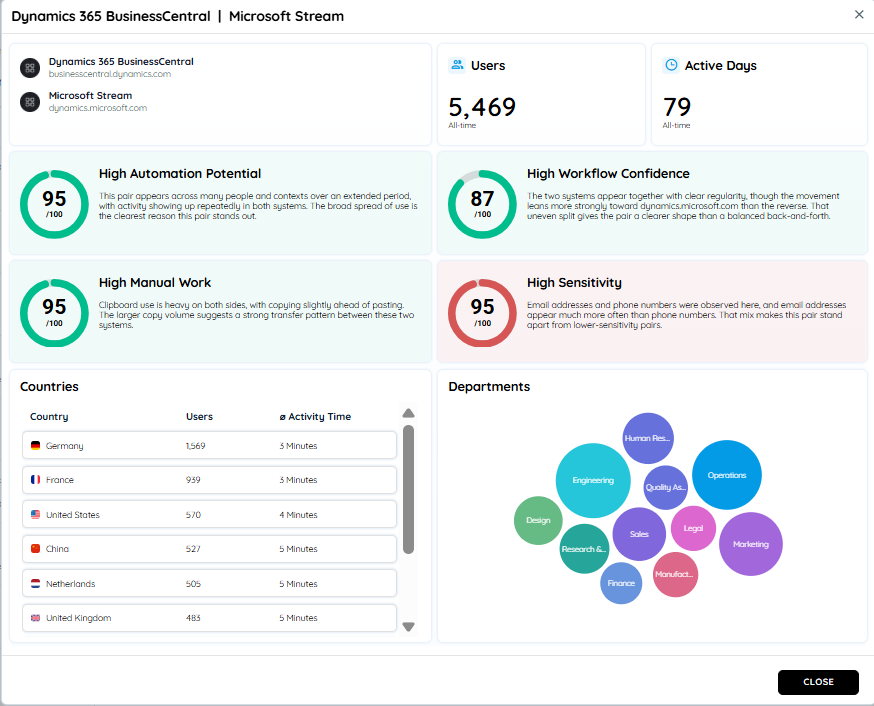
Select an application pair to open its detailed Automation Opportunity view.
The detailed view provides:
- Applications involved
- User information
- Activity information
- Automation Potential
- Workflow Confidence
- Manual Work
- Data Sensitivity
- Affected countries
- Affected departments
Use this information to understand where the workflow occurs, which business areas are involved, and whether the opportunity warrants further investigation.
Filters, Search, and Sorting
Automation Opportunities supports filters, search, and sorting for analyzing specific opportunities.
Use these controls to narrow the application-pair list and focus on opportunities relevant to your investigation.
For example, when reviewing potential automation candidates, prioritize combinations such as:
- High Automation Potential
- High Workflow Confidence
- High Manual Work
- High Recurrence
- High Users
- High Active Days
Use the resulting list as a starting point for detailed investigation rather than treating the filtered results as confirmed automation recommendations.
From Workforce Persona to Automation Opportunity
The two features work best when used together.
Step 1: Identify the work pattern
Start with Workforce Personas.
Look for personas with:
- High Manual Work
- High Recurrence
- High Confidence
- Significant User population
Step 2: Understand the applications
Open the persona and review Apps Used By Persona.
Look for applications that repeatedly appear together.
Step 3: Investigate the application relationship
Open Automation Opportunities and locate the relevant application pair.
Step 4: Assess the workflow
Review:
- Users
- Active Days
- Automation Potential
- Usage Overlap
- Workflow Confidence
- Manual Work
- Sensitivity
- Recurrence
Step 5: Understand the business scope
Open the detailed opportunity and review the affected:
- Countries
- Departments
Step 6: Validate the process
Confirm with the relevant business or application owner that the observed application relationship represents a genuine business workflow.
Step 7: Prioritize
Prioritize opportunities where the evidence indicates:
High Automation Potential + High Workflow Confidence + High Manual Work + High Recurrence
Consider Users, Active Days, and Sensitivity as additional context when deciding which opportunities deserve further investigation.
Governance Actions
The purpose of these features is to provide evidence for business and technology decisions.
Use the following approach when evaluating an opportunity.
| Finding | Recommended investigation |
|---|---|
| High Automation Potential | Prioritize the application pair for further assessment. |
| High Workflow Confidence | Validate the observed sequence with the process owner. |
| High Manual Work | Investigate repetitive information transfer or manual handling. |
| High Recurrence | Determine whether the workflow is an established business process. |
| Large User Population | Assess the potential organizational impact. |
| High Active Days | Determine whether the workflow persists over time. |
| High Sensitivity | Involve the appropriate security, privacy, or compliance stakeholders. |
| High Risk in the related persona | Investigate the applications and data usage before recommending process changes. |
These are investigation and prioritization actions. The features do not automatically implement or approve automation.
Concrete Example: Identifying an Automation Candidate
Consider a Workforce Persona with:
| Indicator | Result |
|---|---|
| Confidence | High |
| Users | 937 |
| Active Days | 90 |
| Manual Work | High |
| Recurrence | High |
The persona also shows repeated use of several applications.
Investigation
- Open the persona.
- Review the applications used by the persona.
- Identify applications that repeatedly appear together.
- Open Automation Opportunities.
- Locate the corresponding application pair.
- Review Users and Active Days.
- Review Automation Potential.
- Review Usage Overlap and Workflow Confidence.
- Review Manual Work and Recurrence.
- Check Sensitivity and Sensitivity Summary.
- Review the affected countries and departments.
- Validate the workflow with the process owner.
Possible Outcome
The analysis may reveal a recurring workflow where users repeatedly transfer information between two applications.
If the opportunity also has:
- High Automation Potential
- High Workflow Confidence
- High Manual Work
- High Recurrence
the workflow becomes a strong candidate for further automation assessment.
The next step is to validate the actual business process and determine whether automation is technically and operationally appropriate.
Concrete Example: High Usage but Low Automation Potential
A frequently used application pair may involve:
- Many users
- High Active Days
- High Usage Overlap
but still have Low Automation Potential.
This means the applications are frequently used together, but the observed relationship provides limited evidence that the pattern represents a suitable automation opportunity.
Do not prioritize an application pair solely because many users interact with both applications.
Review Automation Potential, Workflow Confidence, Manual Work, and Recurrence together.
Concrete Example: High Sensitivity
An application pair may show:
- High Automation Potential
- High Workflow Confidence
- High Manual Work
- High Sensitivity
This may look attractive from an automation perspective, but the sensitive-data context should be reviewed before proceeding.
Recommended action
- Review the Sensitivity Summary.
- Identify the categories of sensitive-data activity detected.
- Review the affected countries and departments.
- Involve the appropriate security, privacy, or compliance stakeholders.
- Determine whether the proposed automation would maintain appropriate data-handling controls.
The objective is to balance automation opportunity with data sensitivity and governance requirements.
How to Prioritize Opportunities
Use the following indicators together when deciding which opportunities deserve further investigation:
Strong candidate
- High Automation Potential
- High Workflow Confidence
- High Manual Work
- High Recurrence
- Significant Users
- Significant Active Days
Requires further investigation
- Medium Automation Potential
- Medium Workflow Confidence
- Medium Manual Work
- Medium Recurrence
Lower priority
- Low Automation Potential
- Low Workflow Confidence
- Low Manual Work
- Low Recurrence
These levels are not an automatic approval or rejection mechanism. They provide evidence that can help teams prioritize their investigation.
Important Interpretation Guidelines
Keep the following points in mind:
- A Workforce Persona represents an observed application-usage pattern.
- A persona name does not necessarily represent an official job title.
- Review the combination of applications rather than relying on one application.
- High Manual Work does not automatically mean that automation is appropriate.
- Recurrence helps identify repeated work patterns.
- An Automation Opportunity represents an observed relationship between applications.
- An application pair does not necessarily mean that the applications have a technical integration.
- High Automation Potential is a prioritization signal, not confirmation that automation can be implemented.
- Workflow Confidence describes how clearly the application relationship resembles a repeatable workflow.
- High Manual Work combined with High Recurrence can be an especially useful automation signal.
- Sensitivity should be considered before prioritizing workflows involving potentially sensitive data.
- Validate important findings with the relevant business, application, security, or compliance owners.
App Redundancy
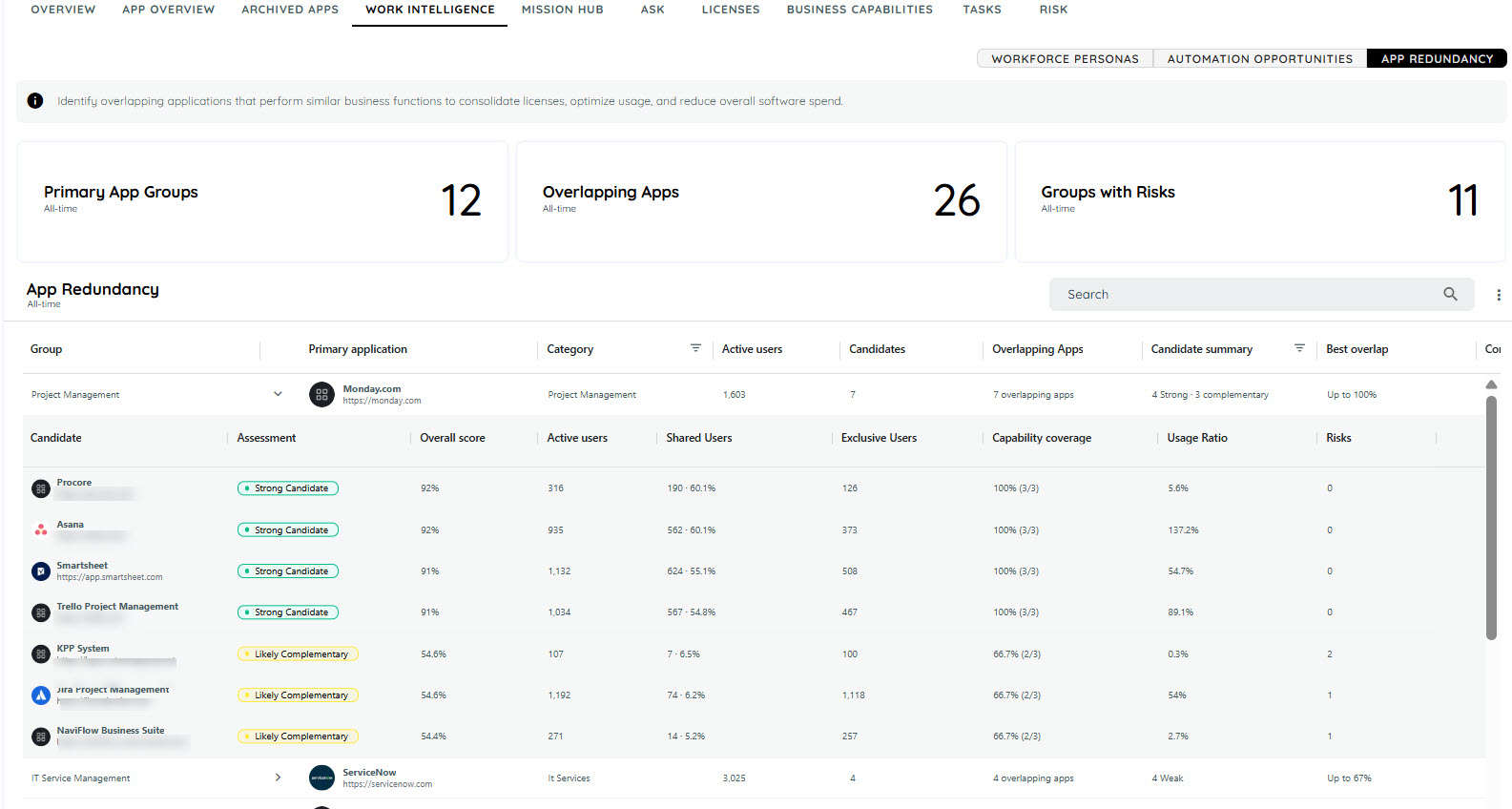
App Redundancy helps you see where applications may do similar work, which application is the main one in each group, and what should be checked before any change is made.
App redundancy occurs when multiple applications are being used for similar purposes, and one application may potentially replace or reduce the need for another.
Primary and Redundant Applications
App Redundancy compares applications to identify potential overlap and determine whether applications may be performing similar business functions.
Primary Application
The Primary Application is the application selected as the main application for comparison within an app group. It is used as the reference point when evaluating user overlap, capabilities, usage, and other comparison metrics.
Redundant Application
A Redundant Application is an application that has significant overlap with the primary application and may provide similar functionality or serve similar business needs.
Being identified as a redundant application does not automatically mean that it should be removed. The application should be validated against business requirements, users, unique capabilities, integrations, security requirements, cost, and other organizational needs before any decision is made.
Example
Suppose an organization uses:
- Microsoft Teams for communication and collaboration
- Slack for communication and collaboration
If the same users are using both applications for similar activities, there is an application overlap. App Redundancy can identify one application as the Primary Application and the other as a potential Redundant Application for further evaluation.
How Does App Redundancy Work?
AppNavi's App Redundancy analysis can identify this overlap by looking at things such as:
- User Overlap : How many users use both applications?
- Capability Overlap : How much functionality do the applications have in common?
- Usage : How frequently are the applications being used?
- Unique Capabilities : What functionality exists only in the candidate application?
- Usage Trends : Is usage of one application increasing or decreasing?
Based on these factors, App Redundancy highlights applications that may have a high level of overlap.
What Is Application Overlap?
Application overlap means that two applications provide similar functionality or are used for similar business activities.
For example, an organization may use two different applications for managing customer relationships. If many of the same users use both applications and they provide similar capabilities, these applications may have a high level of overlap.
This does not automatically mean that one application should be removed. It simply highlights an area that may need further evaluation.
App Redundancy
Understanding the Results
App Redundancy groups applications based on the level of overlap.
Strong Candidate
Applications in this category have a high level of overlap.
They have significant similarities in their capabilities and are often used by the same users.
These applications may be good candidates for further evaluation to determine whether both applications are needed.
Weak Candidate
Applications in this category have some level of overlap, but the overlap is not strong enough to indicate clear redundancy.
The applications may share some capabilities or users while still serving different needs.
These applications may require further investigation.
Likely Complementary
Applications in this category have limited overlap.
They may be used by some of the same users, but they generally provide different capabilities or support different business needs.
These applications are more likely to complement each other rather than duplicate each other.
App Redundancy Decision Workflow
Use the following workflow before making changes based on App Redundancy results.
- Validate the Finding
Review the primary and potential redundant applications and validate the overlap using:
- User overlap
- Capability overlap
- Usage
- Unique capabilities
- Usage trends
- Geography and department information
- Identified risks and deviations
Confirm that the identified overlap reflects an actual business scenario and is not caused by incomplete or misleading usage data.
- Evaluate Business Requirements
Before assigning an application for remediation, review:
- Business requirements
- User needs
- Application integrations
- Security and compliance requirements
- Application costs
- Unique capabilities
- Department or regional requirements
A high overlap score alone should not be treated as a removal decision.
- Assign an Action
After validation, assign an appropriate action for the application.
Possible actions include:
- Retain both applications when they serve different business needs.
- Investigate further when the available evidence is not sufficient.
- Consolidate applications when the organization confirms that both applications are not required.
- Remediate the redundant application when a business decision has been made to reduce or remove its usage.
- Remediate
Carry out the agreed action based on the business decision.
For example:
- Reduce duplicate application usage.
- Migrate users to the primary application.
- Replace or retire the redundant application.
- Update application ownership or assignment.
- Communicate the change to affected users and departments.
-
Review the Result
After remediation, review application usage and overlap again to confirm that the expected change has occurred.
Continue monitoring the applications where required to ensure that duplicate usage does not return.
Key Metrics
App Redundancy uses several metrics to help understand the relationship between applications.
User Overlap
Shows how many users are using both applications.
A higher user overlap means that more users are working with both applications.
Capability Overlap
Shows how many capabilities are shared between the applications.
A higher capability overlap means that the applications provide more similar functionality.
Higher Usage Than Primary
Shows whether the candidate application is being used more than the primary application.
This can help identify applications that may have a significant role in users' daily work.
Unique Capabilities
Shows capabilities that are available in one application but not the other.
These unique capabilities are important when evaluating whether applications can actually replace one another.
Usage Trend
Shows how application usage changes over time.
This can help you understand whether an application is becoming more or less important to users.
Primary and Candidate Applications
App Redundancy compares applications using two terms:
Primary Application
The application selected as the main application for comparison.
Candidate Application
The application being compared with the primary application to determine how much their usage and capabilities overlap.
For example:
Primary: Microsoft Teams
Candidate: Slack
The analysis then evaluates how much Teams and Slack overlap in terms of users, capabilities, and usage.
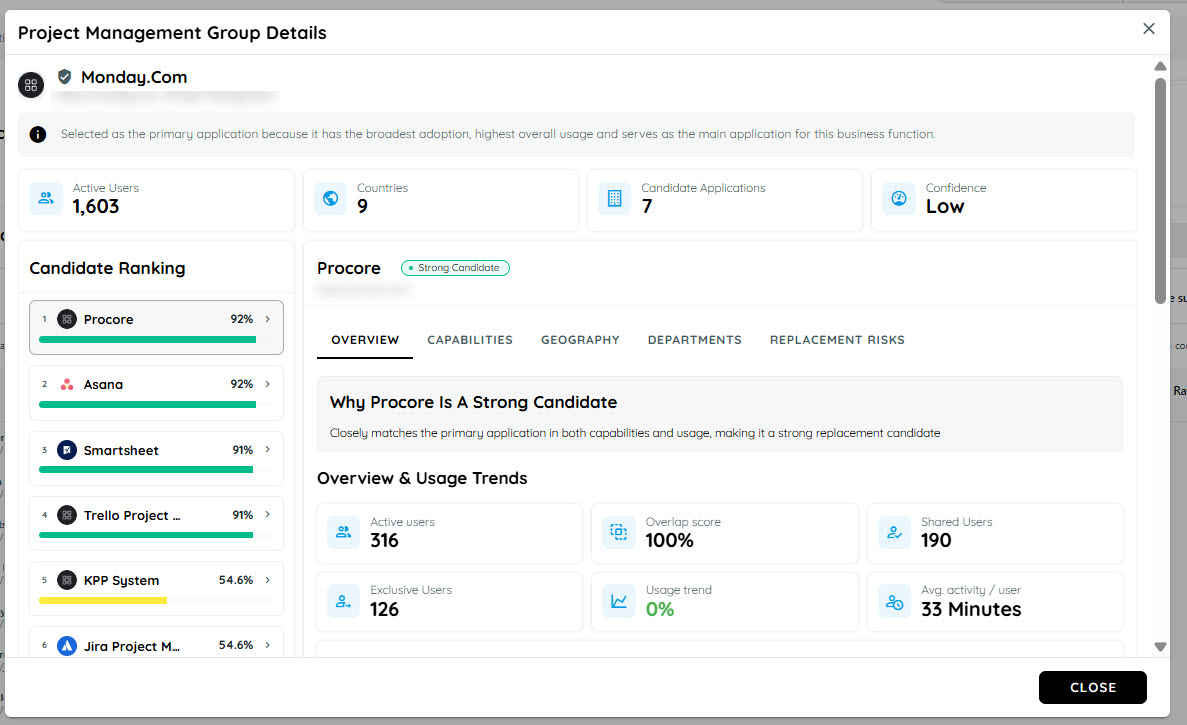
Group Details
Dashboard summary cards
| Values | Explanation | Calculations |
|---|---|---|
| Group | The business-friendly name of the app group. | The name comes from the shared work or capabilities of the apps in that group. |
| Primary | The app selected as the main app in the group. | The app with the highest primary score is selected, unless the evidence is too close or mixed. |
| Category | The category assigned to the primary app. | This is the primary app's catalog category. |
| Active Users | People who used the primary app during the selected time range. | Count each person who had recorded activity in the primary app during that period. |
| Candidates / Overlapping Apps | How many visible alternatives are being compared with the primary app. | Count the candidate apps that meet the dashboard's minimum evidence level. |
| Candidate Summary | A count of candidates by result: strong, weak, likely complementary. | Count each visible candidate once under its assessment label. |
| Best Overlap | The highest overlap score found among the visible candidates in the group. | Take the largest candidate overlap score. If no candidate has a score, a dash is shown. |
| Confidence | How clearly one app stands out as the primary. | Compare the leading primary score with the next score and check whether other apps lead on important usage measures. It is marked as High, Medium and low. |
| Deviations | How many unusual differences need attention. | Count the detected differences, such as unique capabilities, different user populations, or much higher candidate usage. |
Confidence labels
| Value | Explanation | Calculations |
|---|---|---|
| High | The primary app stands out clearly. | Its score is at least 70, it leads the next app by at least 25 points, and no other app clearly leads an important usage measure. |
| Medium | The primary app has a useful lead, but the result is not fully decisive. | It leads the next app by at least 15 points and no more than one important usage measure points to another app. |
| Low | A primary can be named, but the lead is limited or the signals are mixed. | The result does not meet the High or Medium rules, but it also does not meet the No clear primary rules. |
Geography and department values
| Value | Explanations | Calculations |
|---|---|---|
| Country / Department | Where the compared users are located or work. | Usage is grouped by the user's known country or department. |
| Primary users | People in that country or department who used the primary app. | Count distinct primary-app users inside that location or department. |
| Candidate users | People in that country or department who used the candidate app. | Count distinct candidate-app users inside that location or department. |
| Adoption | Candidate usage relative to primary usage in that country. | Candidate users divided by primary users, multiplied by 100. If there are no primary users, 0% is shown. |
| Exclusive Users | How much of the candidate's compared department use is not shared with the primary. | Candidate-only users divided by Shared users + Candidate-only users, multiplied by 100, then rounded. |
| Leader | Which app has more users in that country or department. | Compare candidate users with primary users. The candidate leads only when its count is higher. |
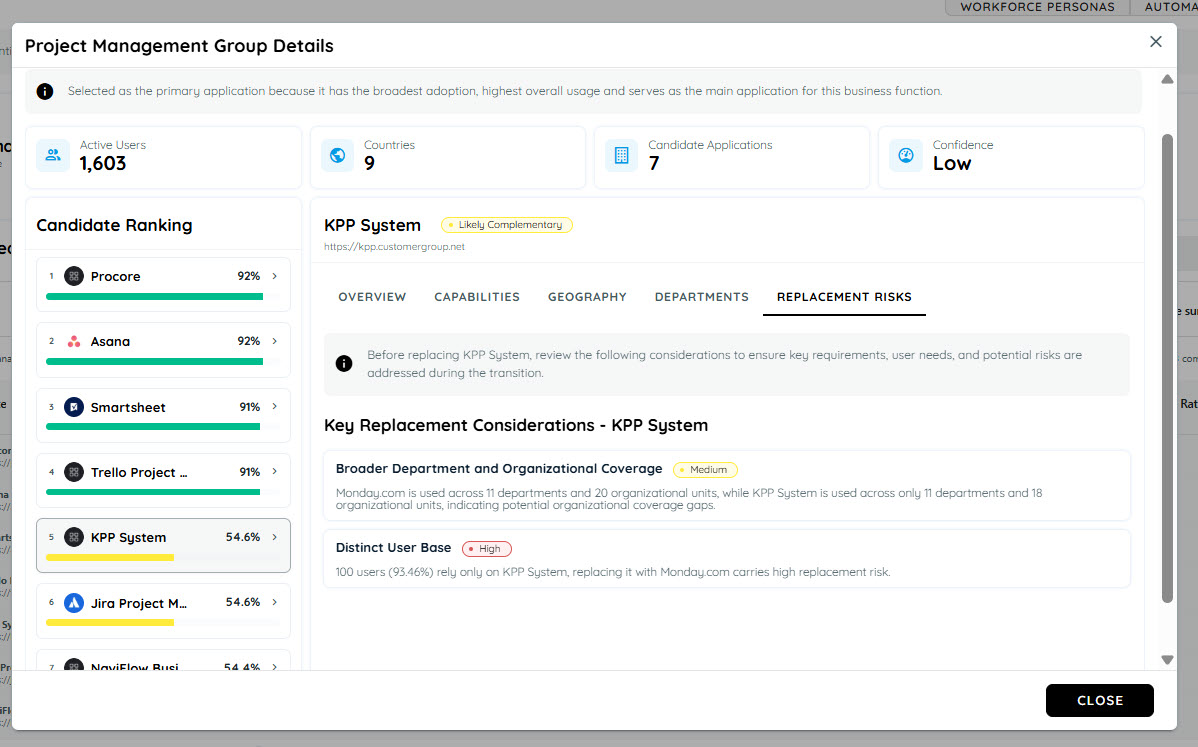
Risks and deviations
These items tell you what deserves attention before replacing or consolidating an app. They are not automatic decisions.
| Value | Explanation | Calculations |
|---|---|---|
| Risk count | How many replacement concerns are listed. | Count the candidate and group risks. If no separate risk list exists, the screen may use deviations as the review list. |
| High / Medium / Low | The importance level assigned to each review item. | Count the items in each severity. The risk bar shows each count as a share of all listed risks. |
| Top risks | The first risks to review. | Sort risks from High to Medium to Low and show the first two. |
| Deviation | A meaningful difference between the candidate and primary. | Detected from visible comparison facts such as missing or unique capabilities, a different user base, regional concentration, broader reach, higher use, specialist use, or growing use. |
Important Note
Business requirements, user needs, costs, integrations, security, and unique application capabilities should also be considered before making a final decision.
Example
Imagine an organization uses two applications for project collaboration.
Application A
- Used by 800 users
- Provides project management and collaboration features
Application B
- Used by 600 users
- Provides similar project management and collaboration features
- 500 users use both applications
Because many users use both applications and the applications provide similar capabilities, App Redundancy may identify Application B as a potential redundancy candidate.
The organization can then investigate whether both applications are required or whether they serve different business needs.
Summary
App Redundancy gives you a simple way to identify applications that may overlap in users, functionality, or usage.
It helps you understand where potential duplication exists and provides useful information for making better application portfolio decisions.
Updated 8 days ago