
Execute Report (v1)
Execute report on the insights of the application and view result.
Endpoint URL
POST https://api-prod-eu-central-1.inappnavi.com/api/public/v1/insights/executeReportPurpose
Execute report on the insights of the application and view result.
Request Structure
When making a POST request to /executeReport,include the authentication token in the header and include the following JSON body.. Below is a common example; parameter names or structures may differ based on your final OpenAPI documentation:
| Parameter | Type | Required | Description |
|---|---|---|---|
TenantId | string | Yes | The unique tenant identifier. |
ClientId | string | Yes | The unique client identifier. |
ClientSecret | string | Yes | The client secret. |
QueryParams | QueryParams | Yes | The Additional data required to process API request. |
QueryParams Parameters:
QueryParams Parameters:| Parameter | Type | Required | Description |
|---|---|---|---|
ApplicationId | string | Yes | The start date for the execution of report on insight data. |
displayedColumns | Array of Strings | Yes | The list of property/column names to include in the insight execute report. Minimum 1 column name is required to process the report. e.g. ["EventType"]. Available displayed columns are[`" ","id","eventType","sessionId","userId",timestamp" ","avatarVersion","integrationMode","browser",browserLanguage" ","pageUrl","pageTitle","pageLoadTime","userRole",country" ","timeZone","areaLabel","elementLabel","areaId",tagType" ","activityScope","activityTime","customField1",customField2" ","customField3","resolution", "organizationalUnit" ] |
reportFilters | Array of ReportFilter | No | The list of filters to be applied to report. |
groupBy | Array of Strings | No | The name of columns on which group by clause will be applied. |
fromDate | string | No | Start date in YYYY-MM-DD HH:MM:SS format. If provided, set TimeRange to VIEW_CUSTOM_DAYS. |
toDate | string | No | End date in YYYY-MM-DD HH:MM:SS format. If provided, set TimeRange to VIEW_CUSTOM_DAYS. |
page | integer | No | The page number to retrieve data from. Defaults to 1. |
itemsPerPage | integer | No | The number of items to retrieve per page. Defaults to 50, if not specified. |
ReportFilter Parameters:
ReportFilter Parameters:| Parameter | Type | Required | Description |
|---|---|---|---|
ColumnName | string | Yes | The column name on which filter will be applied. |
Values | Arrays of string | Yes | The conditional values |
Operator | string | Yes | The textual operator to be applied between column name and values. Available operators are equal_to, not_equal_to, less_than_or_equal_to, less_than, greater_than_or_equal_to, greater_than, between, exists, not_exists, contains, not_contains, begins_with |
ReportFilterOperator Information:
ReportFilterOperator Information:This table shows each column name along with the operators that cannot be used when creating filters for that column. If you see an operator listed in the “Not Available Operator” column, it means that operator is invalid or unsupported for that specific column and will not work in your filter expressions.
| Column Name | Not available operator |
|---|---|
id | exists, not_exists, between, less_than_or_equal_to, less_than, greater_than_or_equal_to, greater_than |
eventType | exists, not_exists, less_than_or_equal_to, between, less_than, greater_than_or_equal_to, greater_than |
sessionId | exists, not_exists, less_than_or_equal_to, between, less_than, greater_than_or_equal_to, greater_than |
userId | exists, not_exists, less_than_or_equal_to, between, less_than, greater_than_or_equal_to, greater_than |
timestamp | exists, not_exists, contains, not_contains, begins_with |
avatarVersion | exists, not_exists, contains, between, not_contains, begins_with |
integrationMode | exists, not_exists, less_than_or_equal_to, between, less_than, greater_than_or_equal_to, greater_than |
browser | exists, not_exists, less_than_or_equal_to, between, less_than, greater_than_or_equal_to, greater_than |
browserLanguage | exists, not_exists, less_than_or_equal_to, between, less_than, greater_than_or_equal_to, greater_than |
pageUrl | exists, not_exists, less_than_or_equal_to,between, less_than, greater_than_or_equal_to, greater_than |
pageTitle | less_than_or_equal_to, less_than, between, greater_than_or_equal_to, greater_than |
pageLoadTime | contains, not_contains, begins_with |
userRole | less_than_or_equal_to, less_than, between, greater_than_or_equal_to, greater_than |
countryCode | exists, not_exists, less_than_or_equal_to, between, less_than, greater_than_or_equal_to, greater_than |
timeZone | exists, not_exists, less_than_or_equal_to, between, less_than, greater_than_or_equal_to, greater_than |
areaLabel | exists, not_exists, less_than_or_equal_to, between, less_than, greater_than_or_equal_to, greater_than |
elementLabel | exists, not_exists, less_than_or_equal_to, between, less_than, greater_than_or_equal_to, greater_than |
areaId | less_than_or_equal_to, less_than, between, greater_than_or_equal_to, greater_than |
tagType | less_than_or_equal_to, less_than, between, greater_than_or_equal_to, greater_than |
activityScope | less_than_or_equal_to, less_than, between, greater_than_or_equal_to, greater_than |
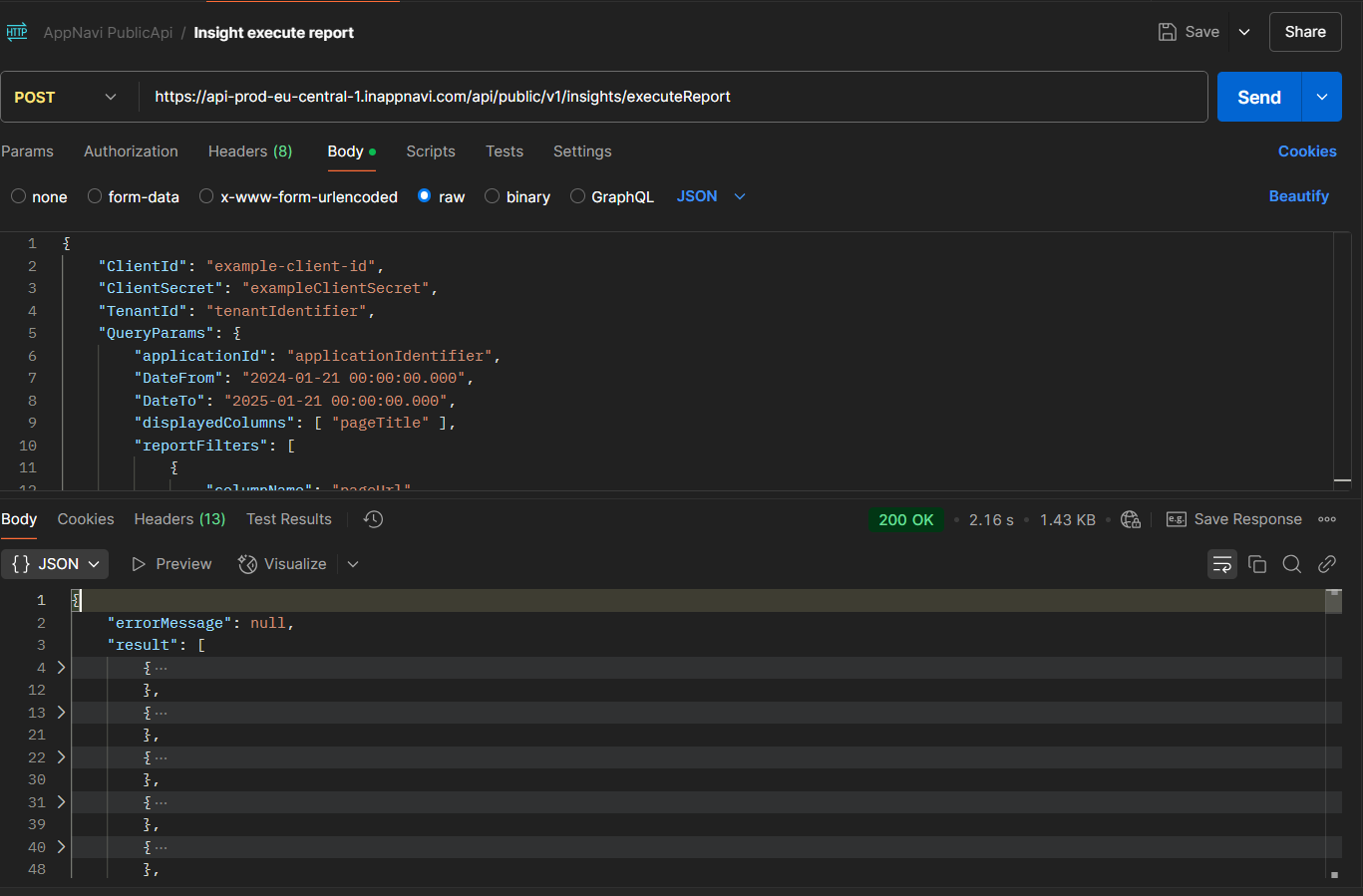
Example: Calling via Postman
- Open Postman and create a new POST request.
- Set the Request URL to:
https://api-prod-eu-central-1.inappnavi.com/api/public/v1/insights/executeReport- Compose the Body:
- In the Body tab, choose raw and then JSON.
- Enter the required parameters in the request body.
- Example request body structure.
{
    "QueryParams": {
        "applicationId": "applicationIdentifier",
        "DateFrom": "2024-01-21 00:00:00.000",
        "DateTo": "2025-01-21 00:00:00.000",
        "displayedColumns": [ "pageTitle" ],
        "reportFilters": [
            {
                "columnName": "pageUrl",
                "values": [ "someValue" ],
                "operator": "contains"
            },
            {
                "columnName": "browser",
                "values": [ "someValue" ],
                "operator": "contains"
            }
        ],
        "groupBy": [],
        "itemsPerPage": 50,
        "page": 1
    }
}-
Send the Request:
- Click Send.
- If everything is correct, you should receive a 200 OK response with a JSON response containing the execute report data.
Updated 6 months ago
Did this page help you?