
SSO Usage Tracking
Overview
SSO Usage Tracking is a Discovery feature that shows how much each discovered application uses Single Sign-On (SSO) for login. It detects which identity providers (IdPs) are used and records login events for analysis.
This feature helps organizations see SSO adoption clearly, without changing any existing event data or login flows.
This page explains SSO usage analytics in App Discovery. Enabling tracking does not configure or enforce SSO authentication. To configure sign-in to AppNavi, see the Single Sign-On (SSO) Setup Guide and Single Sign-On Avatar.
Prerequisites and Permissions
Before you begin, confirm that:
- You have access to the AppNavi portal and permission to change Discovery settings. If these settings are unavailable, contact your tenant administrator.
- App Discovery and Discovery recording are enabled for the tenant.
- The application you want to monitor is discovered and included in recording.
- SSO already works for that application through a supported identity provider. Tracking observes existing authentication flows; it does not establish the connection.
Why This Feature Is Used
Understanding SSO adoption is vital for security and compliance teams. It allows organizations to:
- Know SSO adoption: See which applications are using secure login with SSO.
- Identify Providers: Find out which IdPs are being used most.
- Monitor Security: Make sure logins happen through trusted identity systems.
- Plan Improvements: Understand usage trends to improve SSO adoption.
This feature provides a simple and standardized approach to track authentication methods at scale, helping organizations move toward centralized identity management.
How It Works in AppNavi
When SSO Usage Tracking is enabled, the Discovery feature evaluates event patterns that match valid authentication flows. Only complete flows where a user session transitions from an application to an identity provider and then back to the same application are considered valid.
- Discovery checks login events on already discovered applications.
- If a user logs in using SSO, the system records the event.
- Discovery identifies the IdP and client ID for that login.
- The system counts SSO events and calculates the SSO Usage Index:
This ratio is normalized into an SSO Usage Index and displayed in the Discovery table and dashboards. The following logic is used for normalization:
| Priority level | Meaning |
|---|---|
| Low | Minimal use of SSO |
| Medium | Partial use of SSO |
| High | Strong SSO adoption |
Purpose of This Feature
The goal is to give clear insight into which discovered apps use SSO and how often. This helps with:
- Security Checks: Make sure users log in via trusted IdPs.
- Usage Reports: See trends and adoption rates.
- Better Planning: Decide where to encourage SSO adoption.
No passwords or sensitive data are saved. Only SSO login events and provider information are recorded.
How to Enable SSO Usage Tracking
- Navigate to the Discovery Overview page within the portal.
- Click on the three-dot (⋮) menu to open the settings panel.
- Enable the SSO Usage Tracking toggle.
- Save the changes.
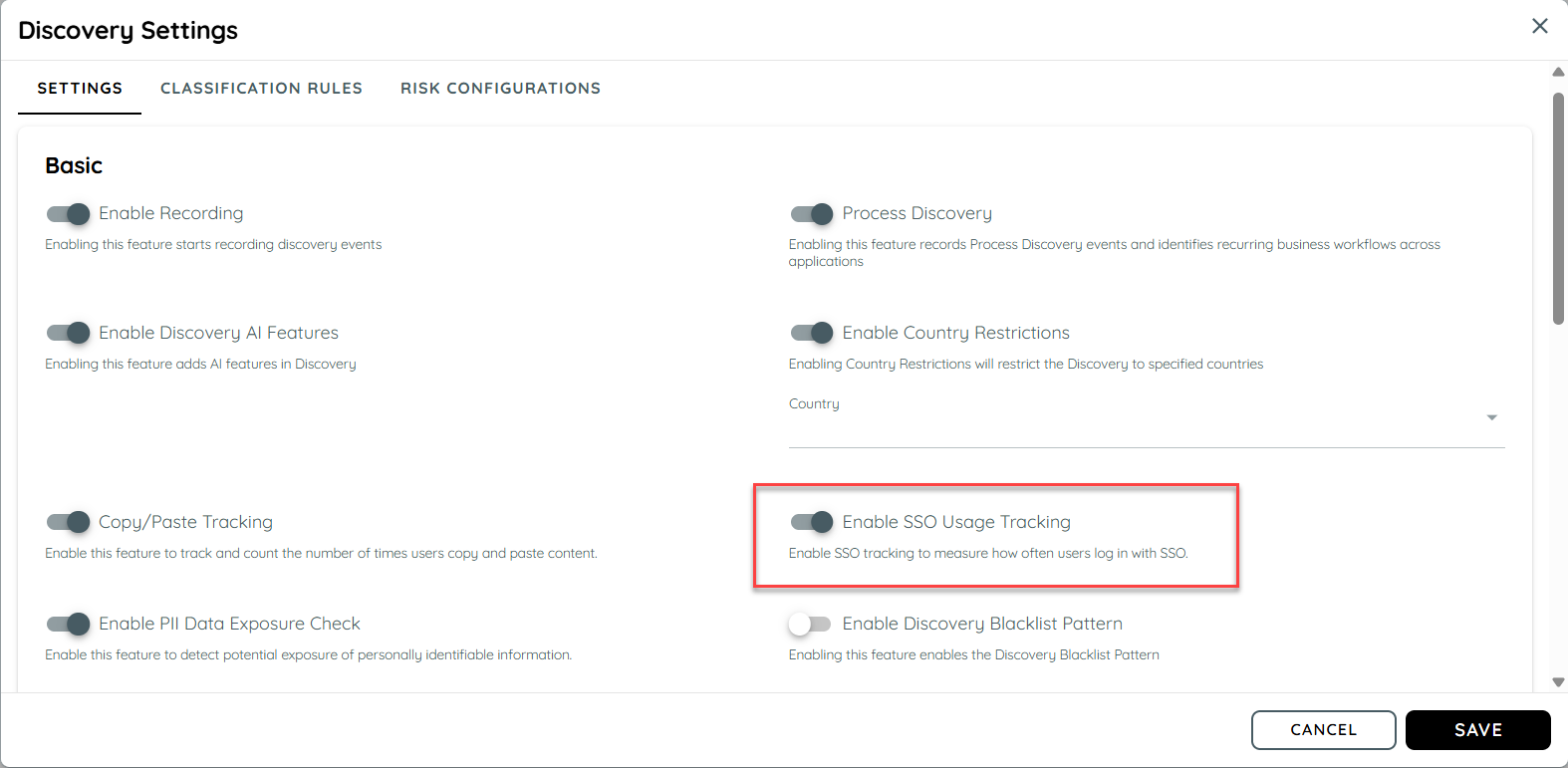
Once enabled, Discovery begins analyzing authentication flows for detected applications. When users access applications using SSO, corresponding events are captured automatically.
Verify Tracking
- Reopen Discovery settings and confirm that SSO Usage Tracking remains enabled.
- Complete a fresh SSO sign-in to a discovered application using a supported provider.
- After the collected activity is processed, locate the application in Discovery and inspect its SSO Usage tooltip and provider details.
The application's analytics include detected SSO activity and the provider used.
If activity is missing, check recording settings, reporting filters, provider support, and whether the sign-in returned to the same application. Missing tracking data alone does not establish that authentication failed.
Supported Identity Providers
The feature currently supports the following identity providers:
- GitHub
- GitLab
- Microsoft
- Auth0
- Azure B2C
- Okta
- Amazon Cognito
- Keycloak
- Ping Identity
The architecture allows new providers to be added easily through future updates.
Example Scenario: Tracking SSO Usage in Discovery
An organization enables SSO Usage Tracking to understand authentication adoption across its internal applications.
Steps
- Enablement
In the Discovery overview, the administrator activates the SSO Usage Tracking toggle and saves the configuration.
- Event Capture
- A user accesses an application integrated with AppNavi.
- The user logs in through an identity provider such as Okta or Google.
- Discovery detects a valid SSO flow (App → IdP → App) and enriches the event with provider name and client ID.
- Data Aggregation
- Over time, Discovery aggregates login data and calculates the ratio of SSO logins to total app logins.
- The ratio is normalized into an SSO Usage Index (Low, Medium, High).
- Visualization
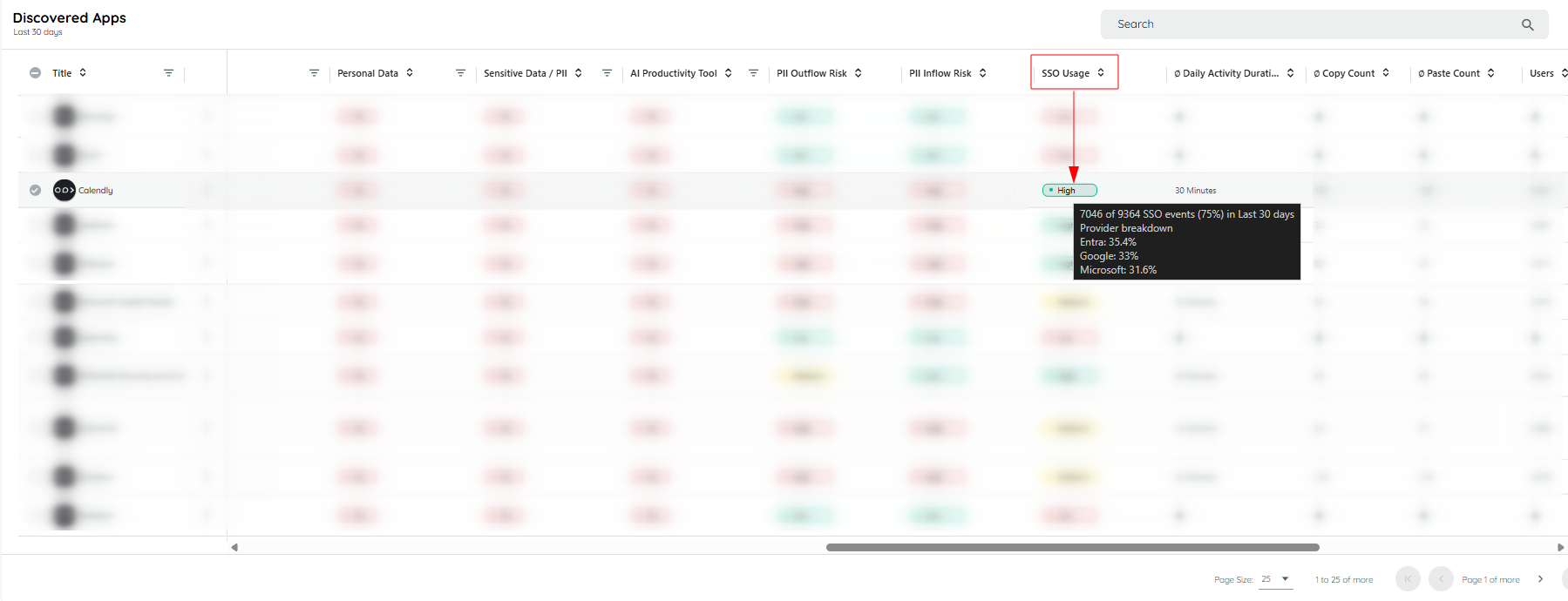
- Discovery table shows a new SSO Usage column.
- Hovering over it shows a tooltip, e.g., “72 of 120 user–app–days with SSO (60%) in last 30 days.”
- Provider breakdown is also shown, e.g., “Entra 70%, Google 30%.”
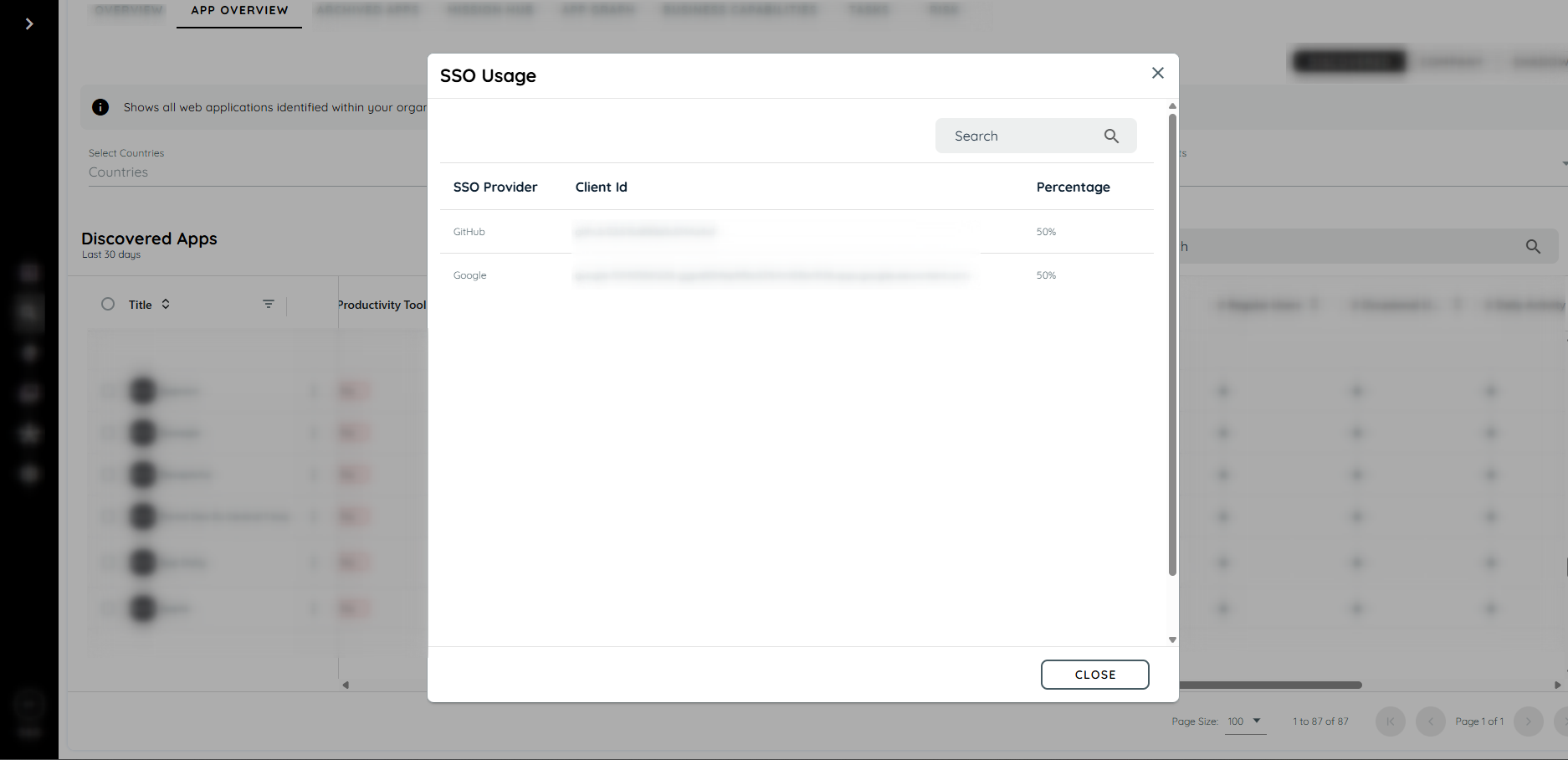
Clicking on the SSO Usage chip opens a dialog that lists all identity providers used, along with their respective percentages.
Interpreting the Data
Read the SSO Usage Index alongside its tooltip, reporting period, and provider breakdown.
Low, Medium, and High describe observed adoption; they do not certify the application's security or confirm that SSO is enforced.
Data represents one user's activity in one application on one day. Its percentage describes observed user app days with SSO, rather than the percentage of individual login attempts.
Tracking depends on captured authentication flows. Missing activity does not necessarily mean an application lacks SSO. Use the relevant SSO setup guide to validate authentication configuration separately.
Summary
SSO Usage Tracking helps see which discovered apps use SSO and how often. It shows trends, provider usage, and an easy-to-read SSO Index. This improves visibility, security, and planning for login adoption.
Updated 26 days ago