Discovery- SSO Usage Tracking
SSO Usage Tracking is an AppNavi Discovery feature that measures how often discovered applications use Single Sign-On (SSO). It identifies the identity provider (IdP) and client ID associated with valid SSO flows, then presents the results in the Discovered Apps table and SSO details dialog. This guide explains the feature purpose, processing logic, configuration steps, supported providers, and result interpretation.
The feature observes authentication activity without changing existing login flows. Results become available as valid SSO events are detected for discovered applications.
Why Use SSO Usage Tracking
Understanding SSO adoption helps security and compliance teams evaluate how applications use centralized identity systems. Organizations can use the feature to:
- Know SSO adoption: See which applications use secure login with SSO.
- Identify providers: Find out which identity providers are used most often.
- Monitor security: Confirm that logins occur through trusted identity systems.
- Plan improvements: Use adoption trends to decide where to encourage SSO.
This provides a standardized way to track authentication methods at scale and supports a move toward centralized identity management.
How SSO Usage Tracking Works
When SSO Usage Tracking is enabled, Discovery evaluates event patterns that match valid authentication flows. A complete flow is one in which a user session moves from an application to an identity provider and then returns to the same application.
- Application events: Discovery checks login events for already discovered applications.
- Flow validation: The system confirms the App -> IdP -> App sequence before counting the event.
- Provider identification: Discovery identifies the identity provider and client ID associated with the login.
- Usage calculation: The system counts valid SSO events and calculates the SSO usage rate.
SSO Usage Rate and Index
The usage rate compares SSO user-app-days with all user-app-days for the application and reporting period:
SSO Usage Rate = (SSO user-app-days / Total user-app-days) x 100
Discovery uses this rate to assign a qualitative SSO Usage Index of Low, Medium, or High. The source material defines the meaning of each label but does not specify numeric boundary values; the exact thresholds should be confirmed from the product configuration.
Table 1. SSO Usage Index interpretation
| Priority level | Meaning |
|---|---|
| Low | Minimal use of SSO |
| Medium | Partial use of SSO |
| High | Strong SSO adoption |
Purpose and Data Handling
The feature gives teams a clear view of which discovered applications use SSO and how often. This supports:
- Security checks: Confirming that users log in through trusted identity providers.
- Usage reports: Reviewing SSO trends and adoption rates.
- Better planning: Prioritizing applications where SSO adoption should improve.
The feature records SSO login events, provider information, and client IDs for analysis. It does not store passwords or authentication credentials, and it does not alter the application login flow.
Configure SSO Usage Tracking
Before you begin, make sure you can access the Discovery Overview page and that the applications you want to evaluate have already been discovered.
-
Navigate to the Discovery Overview page in the portal.
-
Click the three-dot menu to open the settings panel.
-
Enable the SSO Usage Tracking toggle.
-
Save the changes.
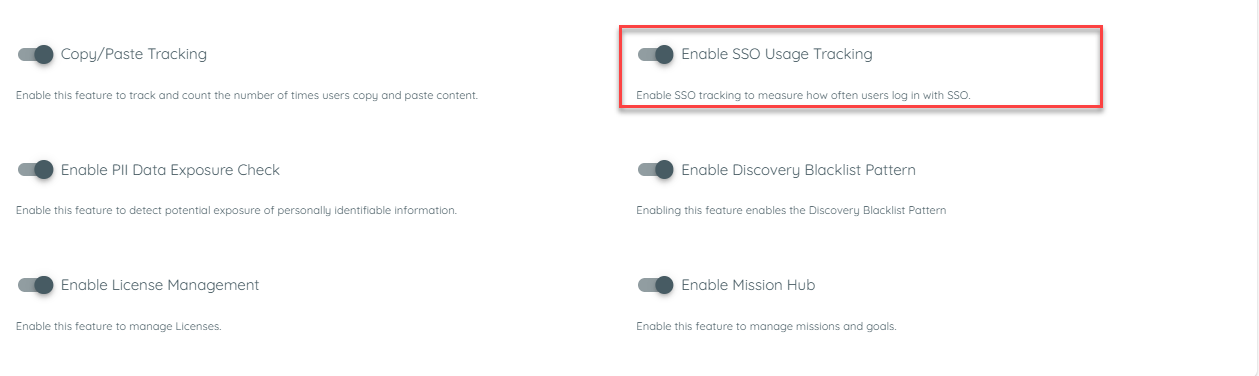
SSO Usage Tracking toggle in Discovery settings
Expected result: Discovery begins analyzing authentication flows for detected applications. As users access applications through SSO, valid events are captured automatically and contribute to the usage results.
Supported Identity Providers
The feature currently supports the following identity providers:
- GitHub
- GitLab
- Microsoft
- Auth0
- Azure B2C
- Okta
- Amazon Cognito
- Keycloak
- Ping Identity
The architecture allows additional providers to be added through future product updates.
Example SSO Usage Tracking Scenario
An organization enables SSO Usage Tracking to understand authentication adoption across its internal applications.
Enablement
An administrator activates the SSO Usage Tracking toggle in the Discovery Overview settings and saves the configuration.
Event Capture
- A user accesses an application integrated with AppNavi.
- The user logs in through an identity provider such as Okta or Google.
- Discovery detects a valid SSO flow (App -> IdP -> App) and enriches the event with the provider name and client ID.
Data Aggregation
- Over time, Discovery aggregates login data and calculates the ratio of SSO logins to total application logins.
- The ratio is normalized into an SSO Usage Index of Low, Medium, or High.
Review SSO Usage Results
The Discovered Apps table includes an SSO Usage column. The value shows the qualitative index, and hovering over it displays a tooltip with the underlying count and reporting period. For example: “72 of 120 user-app-days with SSO (60%) in the last 30 days.”
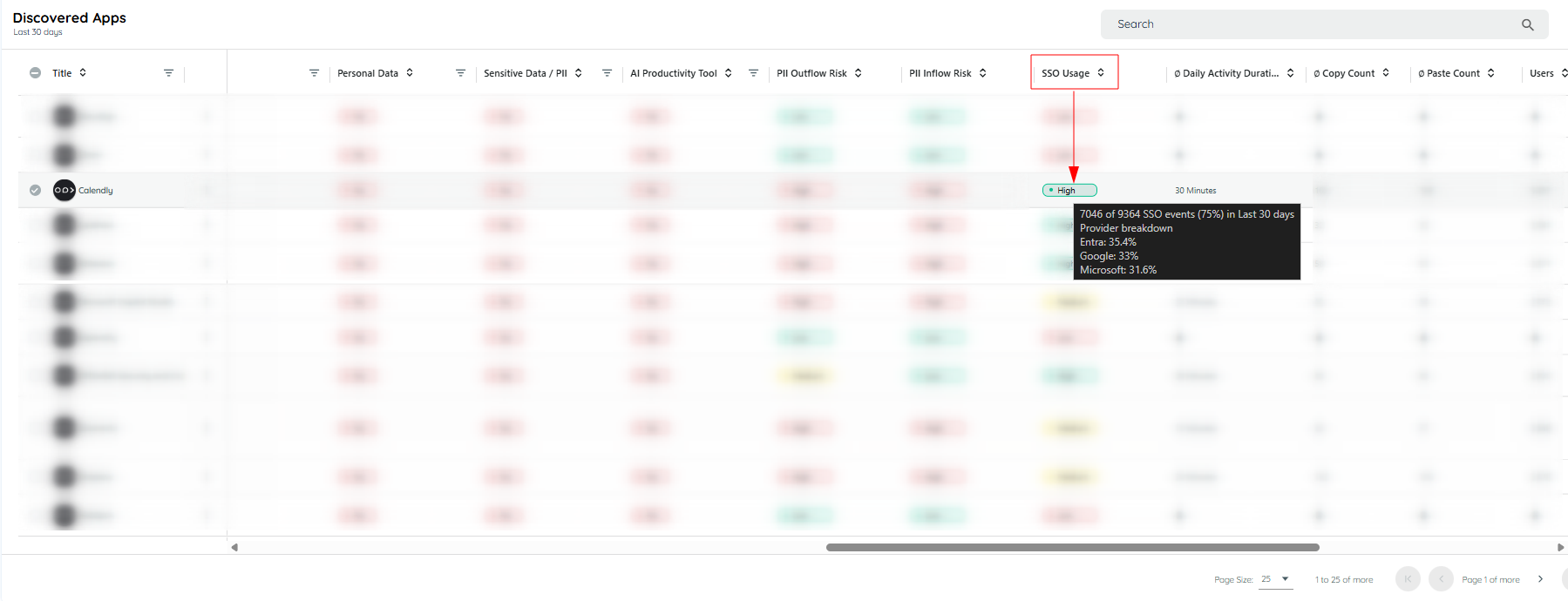
SSO Usage column and provider breakdown tooltip
The tooltip can also show a provider breakdown, for example, “Entra 70%, Google 30%.”
Clicking the SSO Usage chip opens a dialog that lists all identity providers used and their respective percentages.
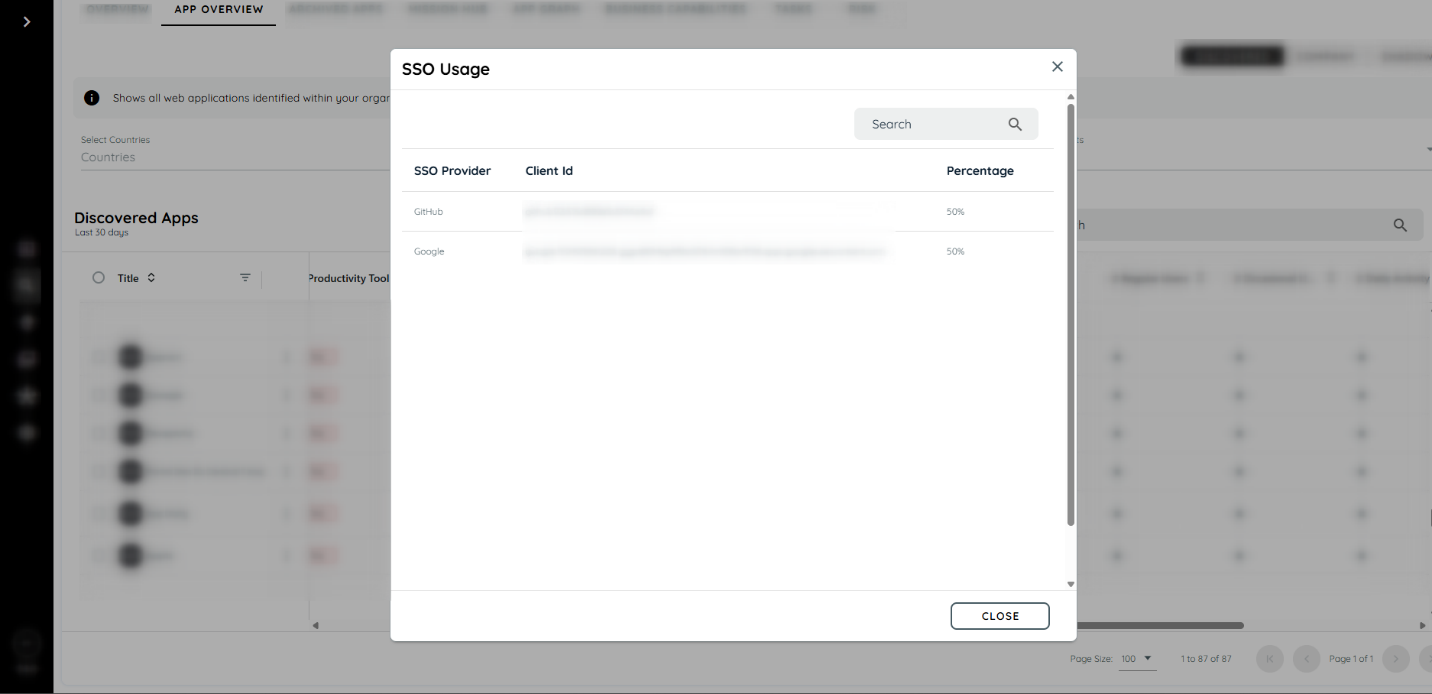
SSO provider details dialog
Operational Notes
Valid flows only: Only complete App -> IdP -> App authentication flows are included in the calculations.
- Discovered applications: The feature evaluates applications that Discovery has already identified.
- Data availability: Usage results appear after valid SSO activity has been observed and aggregated.
- Provider coverage: The supported provider list may expand in future updates.
If no SSO data appears, verify that the toggle is enabled, the application is discovered, and users are completing a supported SSO flow. If the issue continues, confirm that the reporting period contains recent activity.
Updated 21 days ago